


Almost every digital marketing department and SEO agency uses it: the Sistrix Toolbox. The distinctive yellow trend line of the Visibility Index (SI) can be found in almost every report. But this is precisely where the danger lies: anyone who uses Sistrix merely as a monitoring tool for global visibility is failing to realise its true potential. A falling or stagnating Visibility Index often causes unfounded panic in boardrooms, whilst a rising figure is mistakenly hailed as a direct guarantee of traffic.
The reality is that the Visibility Index is not a traffic index. It reflects the findability of a domain based on a representative set of keywords. To generate genuine business value, measurable leads, and sustainable organic ROI, we need to dig deeper.
1. Granular Path Analysis Instead of a Global Domain View
Analysis at the domain level often mixes apples with pears. A massive slump in the magazine or blog section can visually mask the extremely profitable rise in shop directories. You must use segmentation by hosts, directories, or URLs.
- Workflow: Enter your domain and navigate to Structure → Directories in the menu on the left.
- Added value: You can immediately see which specific directory (e.g. /shop/ vs. /blog/) is boosting or undermining the visibility index. This enables precise resource allocation.
2. ‘Threshold Optimisation’ (Low-Hanging Fruit on Page 2)
Keywords ranked between positions 11 and 15 (page 2 of Google’s search results) generate almost no traffic but often require only minimal on-page or content adjustments to jump onto the highly trafficked first page.
- The filter trick: Go to Keywords. Add a filter: Position → greater than 10 and a second filter: Position → less than 16. Sort the list in descending order by search volume.
- Expert tip: Combine this filter with filtering by “search intent”. Target transactional keywords specifically to boost revenue directly.
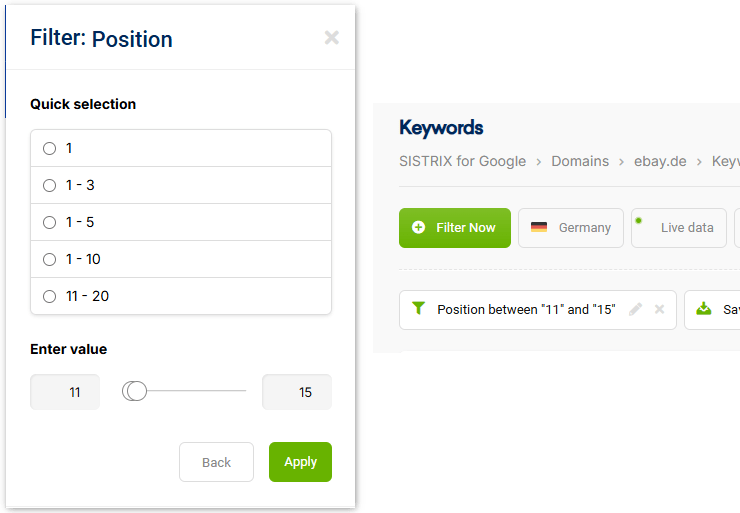
Our tip: Save this URL parameter with these values and simply append it to the URL of the keyword report, rather than clicking through the filters with your mouse:
?filters=%5B%5B”p”%2C”between”%2C%5B11%2C15%5D%5D%5D
3. Keyword gap analysis via cross-comparisons
Your strongest competitors are ranking for terms that you haven’t even considered yet. The ‘Differences’ (Keyword Gap) feature systematically uncovers these gaps. Enter your domain, click on SERPs → Competition → Compare Keywords and add up to three direct competitors. Select the option “Competitors rank, but my domain doesn’t”. This immediately provides you with plenty of ideas for a content plan featuring highly relevant terms.
4. Identifying keyword cannibalisation
If Google doesn’t know which subpage provides the best answer to a search query, a domain’s rankings for a keyword will fluctuate wildly. This is known as keyword cannibalisation – a major performance killer.
- Analysis: In the ‘Keywords’ section, click on the ‘Show keyword cannibalisation’ filter to view all terms on your domain that could potentially be affected by keyword cannibalisation.
- Symptom: If, in the graphical history over time, different URLs from your domain constantly alternate for the same keyword, there is a structural content issue. The only solution here is to merge the pages or implement clear de-optimisation/canonical tags.
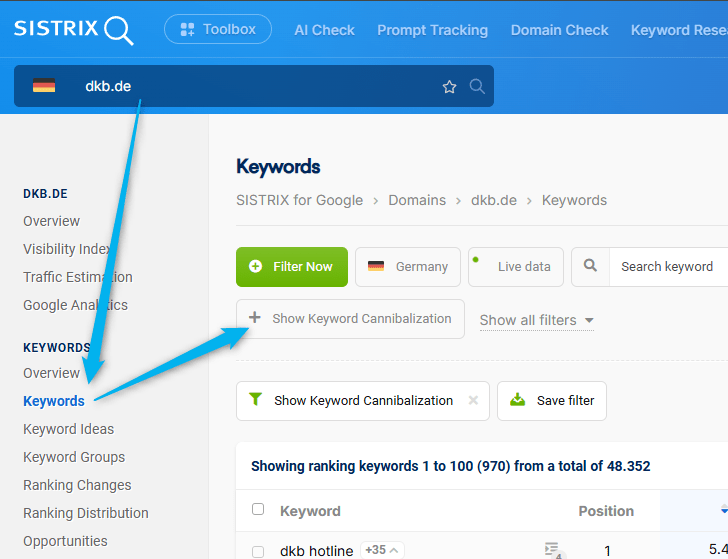
Our tip: If SISTRIX does not display the filter button, you can force it to appear by appending “/multirankings/1” to the URL. For large websites, SISTRIX sometimes does not appear to offer the filter option.
5. Creating the “real” visibility index for niches (Project SI)
The standard Sistrix Visibility Index is based on a fixed set of one million keywords (or the extended data pool). For highly specialised B2B niches or local service providers, this index is often not meaningful, as the relevant technical terms are either not included or get lost in the noise.
The solution: Create your own project in the Optimizer module and enter your custom keyword set (up to several thousand niche terms). Sistrix uses this to calculate a bespoke project visibility index that accurately reflects your market reality. You can even specify the exact device (mobile vs. desktop) and the city for local tracking.
6. Use regular expressions (RegEx) in table filters
With tens of thousands of ranking keywords, it’s easy to lose track of the big picture. Advanced SEO managers filter keyword lists using regular expressions (RegEx) to isolate complex, granular patterns without having to apply countless individual filters.
In the keyword filter, select the ‘Regular Expression (RegEx)’ option. Here are two invaluable formulas for your work:
RegEx Formula | Purpose / Intent | Example Matches |
^(how|why|what|where|how much) | Isolates informational search queries (W-questions) for blog content. | “How does SEO work?”, “How much does Sistrix cost?” |
(buy|price|book|agency)$ | Filters out transactional keywords at the end of the customer journey. | “Book SEO consultancy”, “SEO agency” |
7. Systematic analysis of visibility drops
When the visibility index plummets, many companies resort to knee-jerk reactions. However, it is important to keep a cool head and mathematically isolate the drop. Use the following checklist to do so:
- Check for Google updates: Sistrix automatically displays pins (events) on the chart when an official Google Core or spam update has taken place. Does the drop correlate exactly with the pin?
- Compare hosts: Check whether the loss affects the entire domain or whether, for example, an entire directory was temporarily de-indexed due to an incorrect robots.txt directive.
- Isolate lost keywords: Under ‘Ranking Changes’, filter for ‘Deteriorated Rankings’ and ‘Lost Keywords’ and analyse whether it was primarily high-volume keywords that were lost or whether there was a widespread loss across thousands of long-tail terms.
8. The Page Efficiency Index (PEI) as an efficiency guide
A high visibility index is great, but how much effort lies behind it? The Page Efficiency Index (PEI) puts visibility into perspective relative to the number of indexed pages. It shows you how ‘efficiently’ your content is actually performing.
PEI = Visibility Index / Number of ranking URLs
Application: If your website has 10,000 URLs in the index but only achieves a VI of 1.0, your PEI is extremely low. You’re carrying around a huge amount of ‘content dead weight’ (zombie pages) that’s draining your crawl budget. A high PEI, on the other hand, indicates an extremely streamlined, perfectly optimised website where almost every page achieves top rankings.
9. Targeting SERP features specifically for Direct Answers & snippet hacks
Traditional blue links are increasingly losing ground in modern Google search results (SERPs). Infoboxes (featured snippets), image galleries, ‘Similar Questions’ (People Also Ask) and AI summaries dominate the screen.
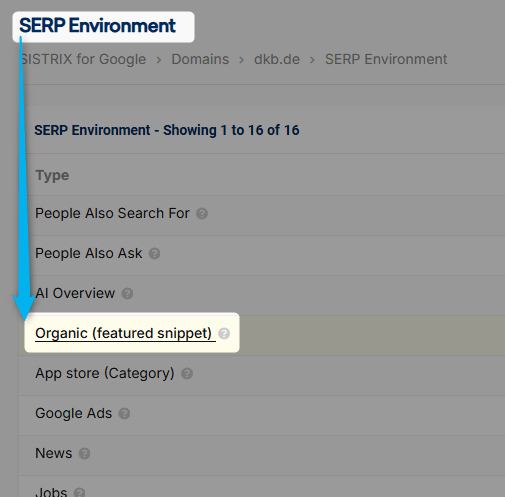
- Workflow: Navigate to SERPS → SERP Environment.
- Objective: Filter for keywords where Google displays a Featured Snippet but your domain is *not yet* the source. Analyse the structure of the current snippet holder (e.g. definition tables or concise bullet points) and optimise your content specifically to secure position 0.
10. Tracking Core Web Vitals & on-page health over time
Technological excellence is the foundation for stable rankings. Using Sistrix’s on-page module (Optimizer), you can set up an automated, weekly crawl that identifies technical errors (404 errors, missing alt tags, incorrect canonical chains).
It is essential to link this data in the dashboard with the actual Core Web Vitals (load times, interactivity, visual stability). In practice, technical errors correlate alarmingly often with gradual declines in the visibility index, as Google consistently penalises poor user experiences.
Summary of best practices: Dos and don’ts of Sistrix analysis
To put these insights into daily practice, the following comparison of key approaches to working with the Toolbox data is helpful:
What to do (Dos) | What not to do (Don’ts) |
Assess long-term trends: Look at SI trends over weeks and months to identify seasonality and genuine trends. | Daily frenzy: Staring at the daily visibility chart and frantically reworking content at the slightest fluctuation. |
Comparing direct competitors: Always use relative visibility when comparing yourself directly with your actual competitors. | Chasing absolute SI values: Looking at an SI value in isolation without context (an SI of 0.5 can already signify market leadership in a narrow niche). |
Using smart filters: Sort keyword lists by search volume, relevance and search intent before exporting. | Unfiltered data export: Blindly exporting huge Excel spreadsheets containing thousands of irrelevant long-tail keywords. |
Using GSC as a “second opinion”: Always verify Sistrix insights against the actual click and impression data from Google Search Console. | Blind trust: Treating tool data as infallible truth and ignoring internal first-party data. |
Conclusion
The Sistrix Toolbox is an invaluable resource for modern businesses – provided it is used with strategic acumen rather than a superficial reliance on data. By combining in-depth structural analyses (directories), bespoke niche indices and advanced filtering techniques such as RegEx, you can transform raw data into concrete, revenue-boosting actionable insights.
Anyone wishing to gain an even deeper understanding of the tool’s operational fundamentals will find the official Sistrix Academy to be a comprehensive, free resource for basic technical knowledge.
Would you like to unlock your website’s full SEO potential? Theoretical analysis is the first step, but scalable, error-free implementation in day-to-day operations requires substantial resources and years of practical experience. This is exactly where we come in: as a marketing technology company, we support you in translating the data-driven insights from tools such as Sistrix into sustainable revenue growth and top-tier Google rankings. Let your data work for you.