


TL;DR
- WebMCP makes websites directly understandable for in-browser AI agents
- Structured JSON tools increase execution accuracy and token efficiency
- Uses existing browser sessions for native security and authentication
- Decouples frontend design from AI integrations for long-term stability
AI agents still navigate websites built for humans. They infer actions from pixels and complex DOM structures. This reliance on visual scraping and vision models makes navigation unstable, error-prone and limited.
With the Web Model Context Protocol (WebMCP), Google and Microsoft reduce this guesswork. The browser technology lets websites communicate in a way AI systems understand directly. By bypassing the human interface, you define clear allowed actions and turn your site from a visual document into a deterministic, structured tool.
WebMCP is currently a joint development for Google Chrome and Microsoft Edge. We expect other browser providers to follow and integrate this standard-to-be into their products.
From Pixels to Precision: The Agentic Handshake
WebMCP allows your website to move from visual documents to deterministic, structured tools for AI. Instead of an agent trying to interpret a complex UI, your site explicitly tells the browser:
“I have a tool called ‘book_appointment.’ It requires a date and a service type. Here is the JSON schema to call it”.
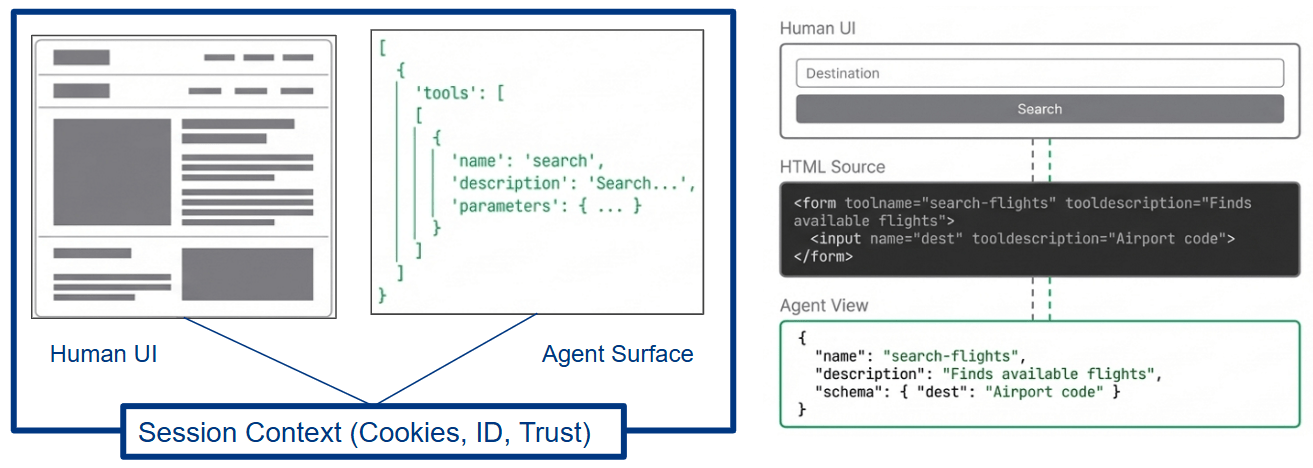
By implementing this “handshake,” businesses see immediate strategic gains:
- 98% Task Accuracy: By providing structured JSON schemas, you eliminate the guesswork that leads to “hallucinations”. ¹
- 89% Token Savings: Agents no longer need to process massive screenshots or DOM trees, significantly lowering the cost of AI interactions. ¹
- Decoupled Stability: Your marketing team can redesign the entire frontend without breaking AI integrations, as the underlying “tool contract” remains stable.
- Native Security: Unlike backend integrations, WebMCP uses the user’s existing browser session and cookies, meaning no separate API keys or complex OAuth flows are required for the agent to act.
And for the marketers among us, user and AI-bot interactions can theoretically be tracked altogether in one session.
Choosing Your AI Integration Path
Not all AI integrations are created equal. And what about ChatGPT Apps? Below is a comparison of current and future methods to help you determine the best “agentic” strategy for your organization.
Dimension | Browser Automation (Legacy) | Backend MCP (Server-side) | WebMCP (The Future) | OpenAI App.SDK (ChatGPT App) |
Method | DOM-Scraping / Vision models | JSON-RPC Server-to-Server | Client-Side Browser Standard (Chrome/Edge native) | Sandboxed iFrame (REACT frontend code) |
Token Efficiency | Very Poor: Hundreds of thousands of tokens per session | Good: Structured data exchange | Excellent: 89% token savings compared to legacy automation | Variable: Dependent on widget complexity and metadata |
Execution Accuracy | ~70%: Brittle; broken by UI updates | High: Uses deterministic server-side logic | 98%: Powered by structured JSON schemas | High: Uses deterministic tool calls |
Security & Auth | Missing: Operates as an external body; often triggers bot detection | Isolated: Requires separate API keys and server-side management | Native: Leverages existing user browser sessions, SSO, and cookies | Isolated: Uses tokens/OAuth flows (Allianz IAM); OpenAI sees processed text |
Setup Complexity | High: Requires custom scripts and constant maintenance | Medium: Requires deploying and managing your own server | Minimal: Implemented via simple HTML attributes and standard JS | Medium/High: Requires full web-app development and OpenAI review |
Potential Reach | High: Works on any public site (though unreliably) | Moderate: Limited to specific enterprise or server-side integrations | Very High: Any end-user through major compatible browsers | Low: Exclusive to ChatGPT Plus, Team, and Enterprise users |
Why MarTech Needs “Agentic SEO”
We are entering an era where you aren’t just optimizing for human eyes; you are optimizing for the Model Context.
The Strategic Shift: Just as brands conquered Google Search in the 2000s, forward-thinking companies are now defining their Tool Manifests.
Think of this as UX for Agents, AX (Agent Experience Optimization): writing natural language descriptions for your web tools so that Gemini, Copilot, or Claude know exactly when and how to recommend your service to a user. If your tool description says: “Use this to find the best hotel and room for your user”, the agent can instantly bridge the gap from a user’s question to your conversion form.
The Three Pillars of Cooperation
1. Context: The browser provides the agent with the “vibe” of the page (including data not currently visible to the human eye). | 2. Capabilities: You register specific functions (e.g., search_flights) that the agent calls directly. | 3. Coordination: The browser acts as a trust layer, enforcing human-in-the-loop confirmation for critical actions like payments. |
For the Tech-Advanced: A 4-Step Sandbox Guide on how to test and use WebMCP already
You can test the “Agentic Handshake” today in Chrome 146 (Canary).
If you don’t have Chrome Canary yet, you can get it here: Chrome Canary.
Then:
- Go to chrome://flags/#enable-webmcp-testing
- Enable “WebMCP for testing”
- Install the extension
- Play with one of these demo pages
- https://googlechromelabs.github.io/webmcp-tools/demos/french-bistro/
- https://travel-demo.bandarra.me/
- https://webmcp-blackjack.heejae.dev/
And you can also watch this little demo video that we created!
If you need help, contact us, and we will have a look at how WebMCP can make your website agent-ready.
The demo website does not contain any usable elements for humans, such as buttons or input forms.
However, in the page source code, we provide AI agents with the information that the color of the circle area can be customized as desired.
- Via a chat window, we inform the Google Gemini language model that we prefer websites in yellow.
- Gemini now decides that it can use the permitted function to color the circle in a shade of yellow.
- In further chat entries, we change our opinion of our AI agent Gemini, and it responds immediately.
Sources used and further reading:
- WebMCP W3C Draft Report: The official specification detailing the API architecture, terminology, and security considerations.
- Chrome for Developers Blog: The official announcement from Google (authored by André Cipriani Bandarra) detailing the early preview program, performance statistics, and use cases.
Technical Demonstrations & Code
- OpenAI Apps SDK Examples (GitHub): The official repository containing example UI components, widgets, and MCP server integrations for ChatGPT.
- Official WebMCP Travel Demo: A live environment provided by the Chrome team to test the “Agentic Handshake” using a searchFlights tool.
Industry Analysis & Community Resources
- ( ¹, ²) webMCP: Efficient AI-Native Client-Side Interaction for Agent-Ready Web Design
- Every Website is going to have two layers, one for humans, one for bots.
- DEV Community Technical Guide: A deep dive into implementing both the Declarative and Imperative APIs, including step-by-step instructions for testing in Chrome Canary.
- Model Context Protocol (MCP) Official Site: The foundational server-side protocol that inspired the client-side WebMCP standard.
FAQ: The “Decision Maker” Essentials
What exactly is WebMCP?
WebMCP stands for Web Model Context Protocol. It is a proposed web standard co-authored by Google and Microsoft that allows a website to expose structured tools directly to in-browser AI agents. Think of it as a “handshake” that turns your visual web page into a machine-readable tool surface.
How does it improve AI performance?
Traditional agents “guess” their way through your site using screenshots and DOM scraping, leading to roughly 70% accuracy. ² WebMCP changes the game:
- 97,9% Task Accuracy: Agents use structured JSON schemas instead of visual guesswork. ²
- 89% Token Efficiency: By calling functions directly, agents avoid processing thousands of tokens worth of images or messy code. ²
- 67,6% Overhead Reduction: Computational costs for running the agent drop significantly. ²
Is this a formal W3C standard yet?
No. It is currently a W3C Community Group Draft and is considered to be in an early incubation phase. While backed by industry giants, it is not yet on the formal Standards Track.
Can an AI agent buy products or sign contracts without my permission?
No. WebMCP includes a “Human-in-the-loop” coordination pillar. For critical actions such as payments or form submissions, the browser acts as a mediator and enforces a mandatory confirmation UI where the user must click “Allow”.
What is the difference between WebMCP and Anthropic’s MCP?
They are complementary protocols that cover different parts of the stack:
- MCP (Backend): Connects AI models to servers, databases, or local files.
- WebMCP (Frontend): A browser-native API that connects agents to the active web page and its local JavaScript context.
You can learn more about MCP here.
How do I implement this on my website?
You have two primary paths depending on your technical needs:
- The Declarative Approach: Ideal for static pages. You simply add attributes like toolname, tooldescription, and toolautosubmit to your existing HTML <form> tags.
- The Imperative API: Best for complex web apps (SPAs). You use JavaScript to register tools via navigator.modelContext.registerTool(), defining custom schemas and execution logic.
Do’s and Dont’s when implementing WebMCP on your Website
While WebMCP is not yet even out in the wild, we have some tips for your first tries with it:
- Minimize “Model Math”: Don’t force the AI to calculate values. If your form needs “minutes-from-midnight,” design the tool to accept a simple string like “11:00 AM” and handle the conversion on the client side.
- Atomic Design: Prefer one tool with multiple optional parameters over ten separate, overlapping tools.
- Strict Validation, Loose Schema: Your tool should have a broad enough schema to let the agent “try,” but return highly descriptive error messages if it fails, allowing the agent to self-correct.
Is WebMCP available for use today?
It is currently available as an early preview in Chrome 146 Canary. To test it, you must enable the #webmcp flag in chrome://flags/#enable-webmcp-testing
Ready to turn your website into a precision tool for the next billion AI agents? Digital Loop can help you audit your current assets and develop an Agentic Strategy.