


The SEOs Timeline to AI Overviews (AIO)
“Yes, astronauts have met cats on the moon, played with them, and provided care,” said Google’s search engine in response to a query by an AP reporter.
“Google described the health benefits of taking a bath with a toaster”
“AI Overview instructed some users to mix nontoxic glue into their pizza sauce to prevent the cheese from sliding off”
As you may have noticed on the internet, since Google launched their AI Overviews (previously SGE, Search Generative Experience) at the most recent Google I/O for developers in May of this year, there have been mixed reactions. These AI-generated search results were not perfect yet, and you may have been able to find many errors. However they were fake or not, stands to be decided. Let’s have a look.
Lately, technology has gotten a lot better, especially with AI, which has come a long way. People have mixed feelings about this.
Some people believe it’s fantastic because it makes things easier and faster, while others worry about the spread of misinformation it might cause.
We need to get used to these changes because this is how things are now.
Hi team, my name is Alex. I’ve been working in SEO for about seven years, mainly focusing on Technical SEO and Core Web Vitals (CWV) as the parts I really like improving.
Here at Digital Loop, we have a team full of experienced marketers and SEO pros with a background in marketing or tech. We all work together to help our clients succeed in their business.
So, In today’s post, I will dive deep into the new SEO world in which AI, or AI Overviews to be precise, is joining the arena.
Is SEO dead now?
Is SEO finally presumed dead in 2024? Do links still matter after AI Overviews were introduced at the Google I/O in May? Everything is changing… How do we approach SEO now? These are the questions every SEO expert was asking while watching the most recent Google I/Os different keynotes and speeches.
And so was I. (I’m just trying to be honest).
Also, since the launch of AI Overviews, the challenges have extended beyond just SEO specialists.
Businesses that make SEO tools (like Ahrefs, SEMrush, etc.) are also struggling. Why is this happening? Well, these SEO tools can’t provide accurate details about how visible AI Overviews are. That’s because AI Overviews mostly appear for users who are logged into their Google accounts.
SEO ranking tools, which are designed to help websites figure out how well they’re doing, typically show data from users who aren’t logged into any account (similar to using a browser in “incognito” mode where it doesn’t remember your history).
But…
Since AI Overviews are mainly seen by logged-in users, these tools CAN’T track them properly right now.
Anyway, stay calm because I come bearing good news.
Here they are:
Firstly, Google isn’t the only player in the universe. It relies on businesses (like yours) even more than you might think. If changes become too drastic, businesses (you?) could abandon Google, and trust me, that’s something Google wants to avoid.
Secondly, AI Overviews only take up one position in the SERP, which means there’s plenty of space left to promote your business. Remember, there are many other SERP features already in existence, such as the “Knowledge Graph Panel,” “Related Searches,” and “Paid Results,” which appear at the top of the SERP.
Finally, it’s unclear whether AI Overviews will become a permanent feature or not. As you may recall, not so long ago, every SEO was worried about SGE, and now, where are the SGE? Well SGE is now called AI Overviews (AIO).
So, DON’T PANIC. Let your new “enemy” become your new best friend. And get over the threshold with me.
Let me reveal what AI Overviews are, how to work with them,
and…
HOW TO PROMOTE YOUR BUSINESS IN THE ERA OF AI OVERVIEWS.
Stay tuned, and let’s dive in!
The Evolution of Google: From Simple Search to AI Overviews
Google, a name synonymous with internet search, has continuously evolved since its inception in 1998 by Larry Page and Sergey Brin.
What started as a PhD project at Stanford University has transformed into a global technology giant, influencing how we access and interact with information daily.
Initially, Google’s unique algorithm, PageRank, set it apart by ranking websites based on their relevance and the number of links pointing to them, rather than just keyword matches. This made Google’s search results more useful and quickly popular among users.
*Actually, the latest leak confirmed that the links still matter…
As technology advanced, Google recognized the potential of artificial intelligence (AI) in enhancing its services. It began investing heavily in AI research, leading to the development of technologies like Google Assistant and advancements in machine learning algorithms that improved search functionalities and ad targeting.
The idea of SGE (Search Generative Experience) came about after OpenAI released ChatGPT, a powerful language model, in November 2022. Google saw its potential impact and quickly started working on a competitive AI search solution.
In April 2023, during its developer conference, Google introduced Project MAGI, the precursor to SGE. This project gave us a peek into their vision for the future of AI-powered search.
One month later, in May 2023, Google launched SGE as part of Search Labs, initially available only to users in the United States. They planned to expand it widely by December 2023, but this target date was later removed.
By August 2023, Search Labs, including SGE, became available in India and Japan. By November 2023, it had expanded to over 120 additional countries and territories, supporting several new languages.
*Although the name “SGE” might still be used casually, it is now officially known as “AI Overviews” and is integrated into the core Google Search experience.
Here’s a brief timeline of key developments from SGE to AI Overviews.
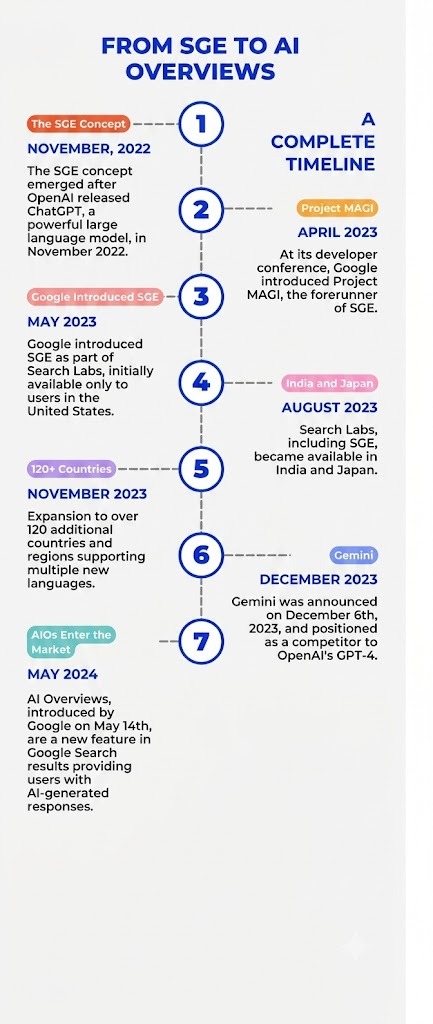
So, in a significant leap forward, Google announced the introduction of AI Overviews on May 14th. This feature represents a pivotal shift in search technology, utilizing the power of generative AI, specifically Google’s Gemini model, to enrich the search experience.
AI Overviews provide a broader, more informative context to search queries by generating concise summaries and insights.
By the end of 2024, it is expected that over a billion users globally will have access to this enhanced search capability.
Understanding Gemini
At the heart of AI Overviews lies Gemini, a generative AI model developed by Google.
Gemini is trained on massive datasets of text and code, enabling it to perform various tasks like text summarization, creative writing and … question answering? (*crickets sound).
Unlike traditional search algorithms that rely on keyword matching, Gemini excels at multi-step reasoning. It can analyze search queries, delve into relevant web pages, and synthesize the information to create a concise and informative overview.
An important aspect of Gemini is its potential for multimodality. Right now, AI Overviews mainly give you text summaries, but Google is hinting that future versions could mix in elements like images or videos to make things even clearer.
That’s something to look forward to, right?
How AI Overviews Work
Okay, let’s test this tool a bit and take a quick look at how to start working with AI Overviews.
First, of course, you need to initiate a search: enter a query into the Google Search bar.
Here’s an example:
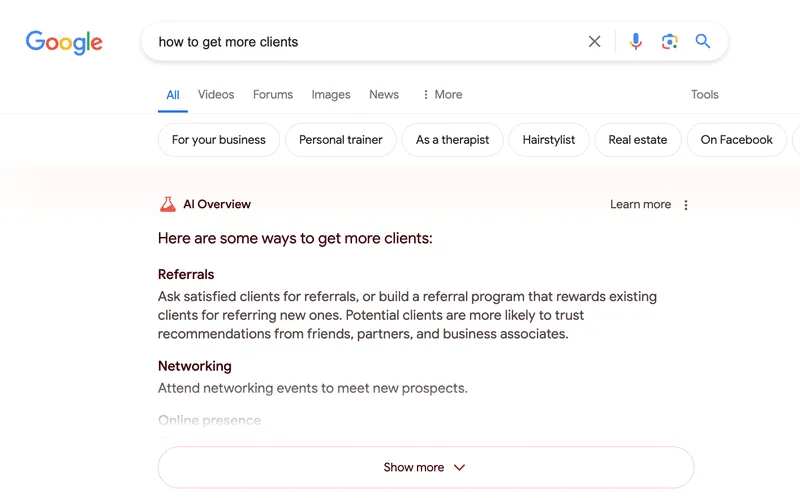
Further, (I asked Gemini to explain how it works its magic), and… here is the response I received:
Step #1: Understanding Your Question
Gemini kicks into gear when you ask it something. It figures out what you really want to know and finds web pages that are most likely to have the answers.
Step #2: Digging Deeper
Once Gemini finds the right web pages, it dives in to pull out the important bits of info and sees how everything connects.
Step #3: Summing It Up
Using what it’s learned, Gemini then puts together a clear and useful summary that gets right to the point of your query.
Step #4: More Than Just Answers
The AI Overview pops up right next to your usual search results. This gives you a bigger picture and a starting point to dig even deeper.
Hope this is true, unlike cats on the moon, but who knows…
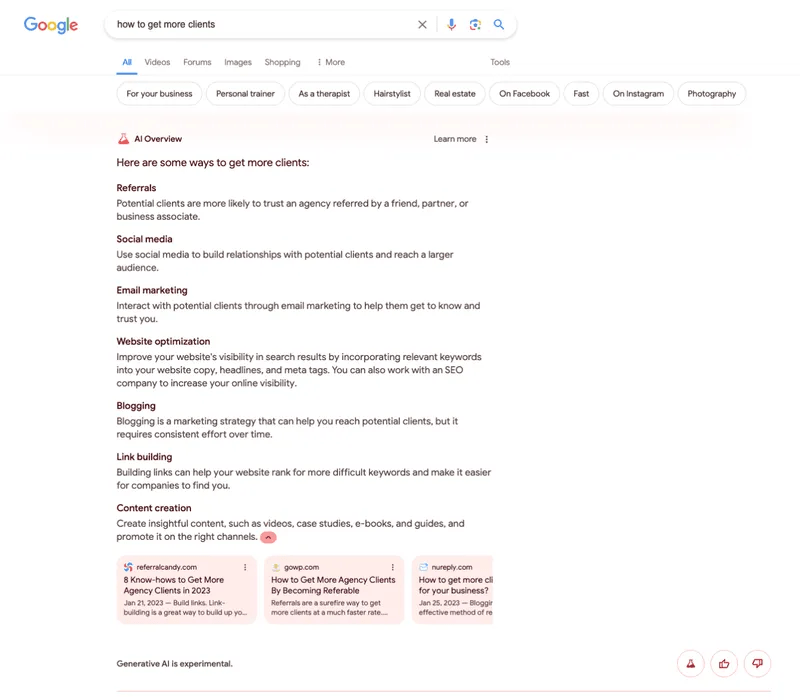
And here’s what the AI overview looks like when you expand it by clicking “Show more”:
Who has access to AI Overviews
At its Google I/O conference, Google announced that it expects to make AI Overviews available to over a billion people by the end of the year.
Impressive, right?
But…
Along with the growing popularity of requests for “AI Overviews”…
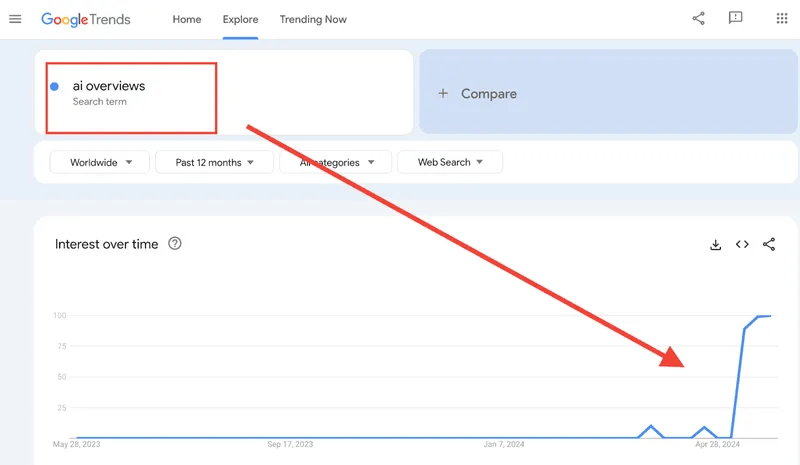
Many people prefer sticking to their old ways and are finding it tough to figure out how to disable this new feature.
You can also see a spike in the Google trends chart for “turn off AI overviews” during the week that AI Overviews were launched to the public.
Why Are AI Overviews Limited?
Google’s announcement and rollout of this feature seemed abrupt, but it’s still somewhat limited. We’ve observed that overall AI Overviews appear for far fewer queries, even among informational searches, than did SGE results in Labs.
This indicates that there is some hesitation from Google to launch a full-scale implementation.
Some of the causes for why AIOs aren’t showing up for more queries could include:
- Intent mismatch between what the searcher is looking for and what AI Overviews currently generate.
- Lack of authority and trust in the AI overview results (i.e. sources shown in the AIOs are sometimes from questionable sites)
- Lack of usefulness – AIOs have fewer filters and features than traditional search results making them potentially less useful for searchers.
How to try AI Overviews?
If you are going to dive deep in the AI ocean. Here is a simple guide for you.
1. On your computer, open Chrome Browser.
Make sure you’re signed in to your Google Account with Incognito mode turned off.
2. At the top of the browser, click New tab “+”.
3. At the top of the page, click Labs. Like that:
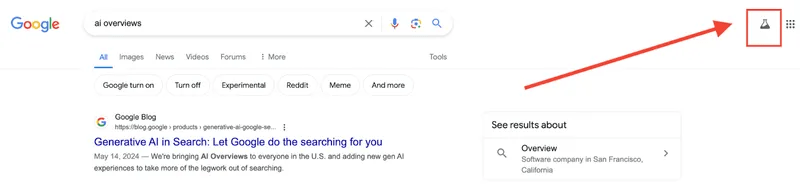
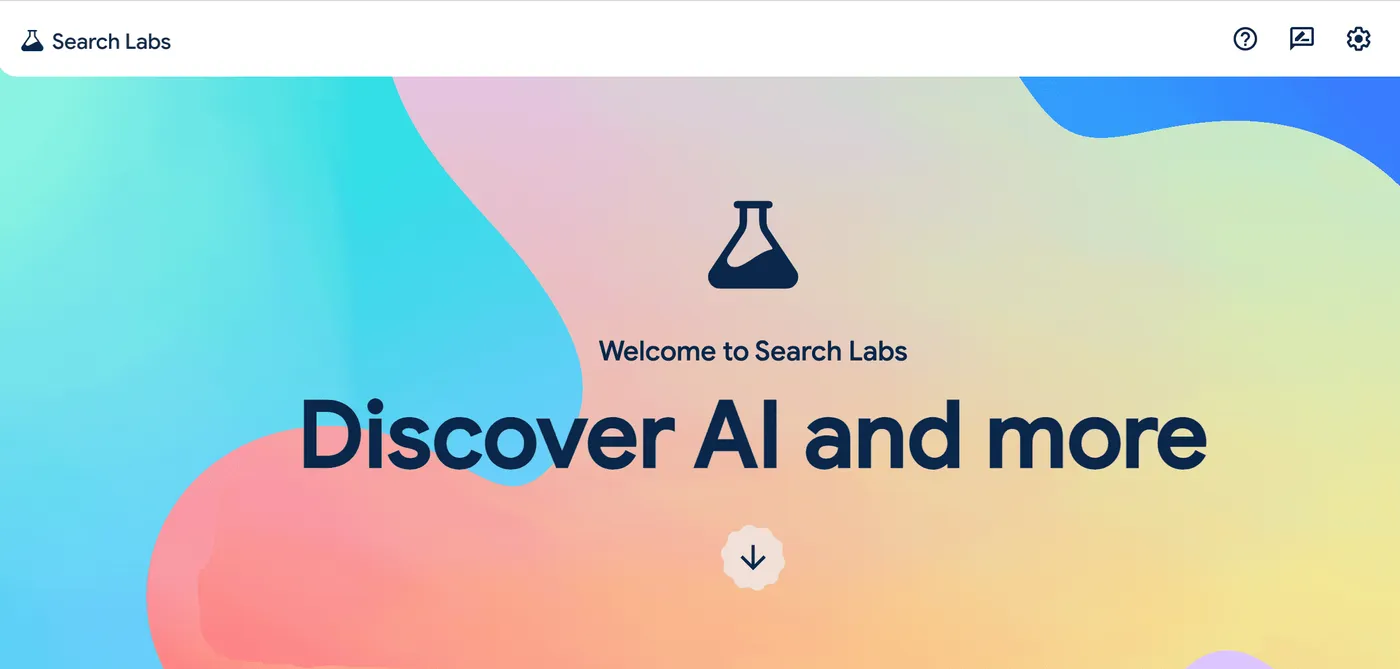
Then click Manage:
4. Toggle off or on “AI Overviews and more.”
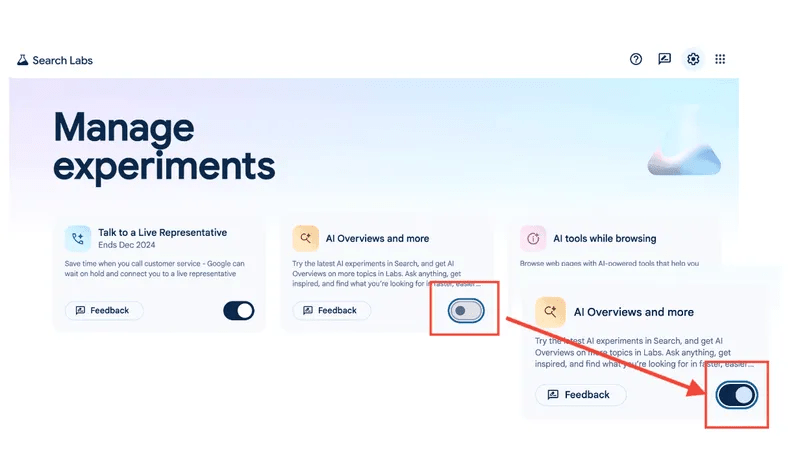
Enjoy the result.
How to hide AI Overview results in the SERP (the hard way)
Dealing with AI Overview results in search engine results pages (SERP) can be frustrating for some users. There isn’t a built-in way to completely disable AI Overviews in Google Search results (as of June 2024).
However, here are two options you can try:
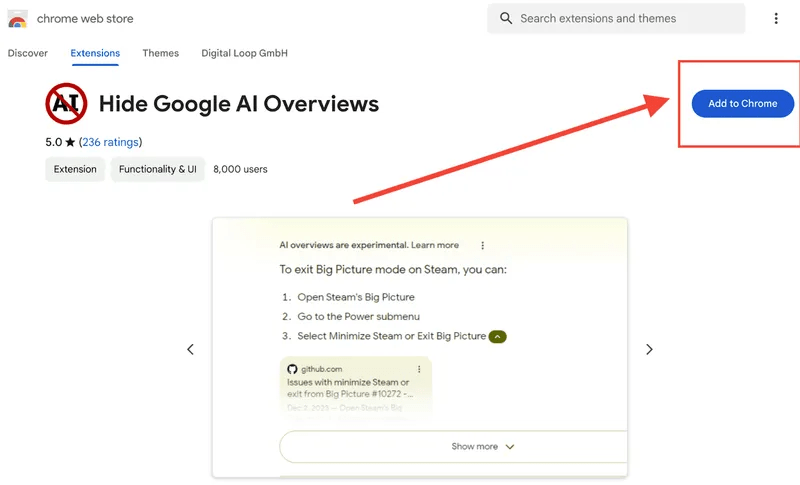
Browser Extensions
There are browser extensions like this that can filter out AI Overviews along with other elements on the search results page like discussions or shopping results. These extensions work by injecting code to hide those sections.
Keep in mind that Google can potentially make changes that might break these extensions in the future.
Search Engine Change (Limited Effect)
This method involves adding a custom search engine for Google. While it won’t hide AI Overviews entirely, it can affect how the results page displays.
Here’s how to do it:
Go to a webpage like this one (This creates a custom search engine).
Then, do your search on Google.com.
In your browser settings, go to the search engine menu (Settings -> Search engine in Chrome or Settings -> General -> Select search engine in Edge) and choose “Google Web” from the list.
It’s important to note that the second method might not completely remove AI Overviews, and it may not be available on all browsers.
How to Adapt Your Website and Win with AI Overviews
To stay at the top of the SERP, you will need to adapt your SEO strategies to align with these new AI features.
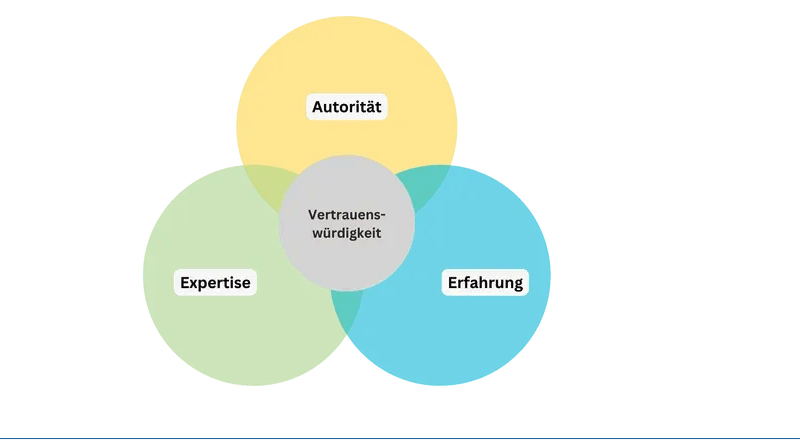
For instance, SEOs have known for years that it’s crucial to create optimized, high-quality content to rank highly. This is important, along with adhering to Google’s standard of E-E-A-T: expertise, experience, authoritativeness, and trustworthiness.
So, Let’s take a closer look at possible ways to build SEO in the AI Overviews era.
Build a Strong Brand
Want to rank better? Build a strong brand presence.
There are plenty of opinions among the SEO community that websites with a strong brand presence rank better. You can find insights of this here, here, and even… here.
Actually, In my latest article about “Parasite SEO,” I described this tactic for promoting your products using well-known websites. You can check it out here.
But…
Who is stopping you from creating your own website like “Forbes”? The road of 1,000 miles starts with one step. No matter how big your goal is, you can achieve it if you just take the first step.
Thus, focus on building a strong brand presence to stand out in search results. When your brand is mentioned across the web, especially by authoritative sources, it shows that your business has recognition and relevance for your audience.
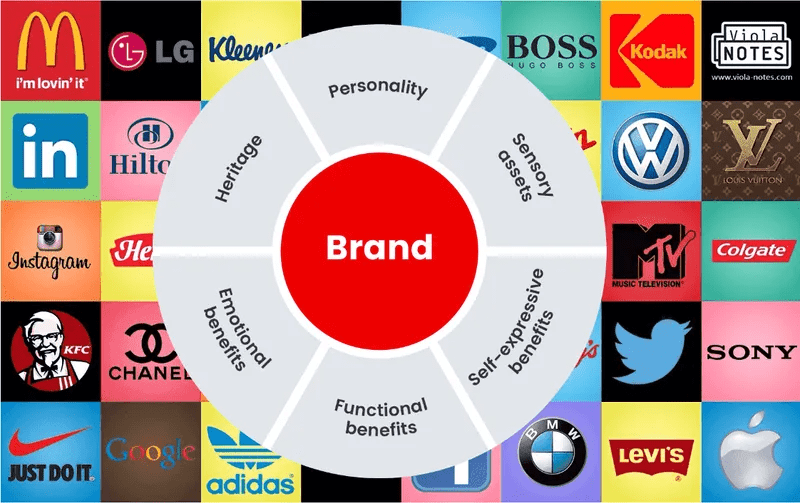
Image Source
Write Helpful Content (I Know, I Know… Boring Basics)
I always say this, but only a few listen…
The problem with helpful content is that nobody really knows how to understand if the content is truly “helpful” or not.
So, here is a tip for you: If you trust Google, then trust it to the end. Write articles and measure their keyword presence via Google Search Console (GSC) or any SEO tools like Ahrefs.
Based on my experience, truly helpful content usually has a huge number of keywords in the SERP. This doesn’t mean you will get traffic from the start, but the number of keywords indicates that the content has potential for growth.
And, another interesting thing is that a GOOD copywriter usually writes ALL articles with a huge number of keywords.
So, try to find YOUR copywriter.
Look at Different Formats
Yes, really… We live in an insane era of video content. TikTok and Instagram can bring you millions of visitors/followers in hours.
Start creating short videos for TikTok and Instagram, and long educational videos for YouTube.
Be on top among searches in video content (on YouTube).
Being at the top of searches on social media video platforms like TikTok, Instagram, and YouTube might sometimes be more useful than appearing at the top in Google. This may not apply to all brands, but it could be valuable for some. Just think about that.
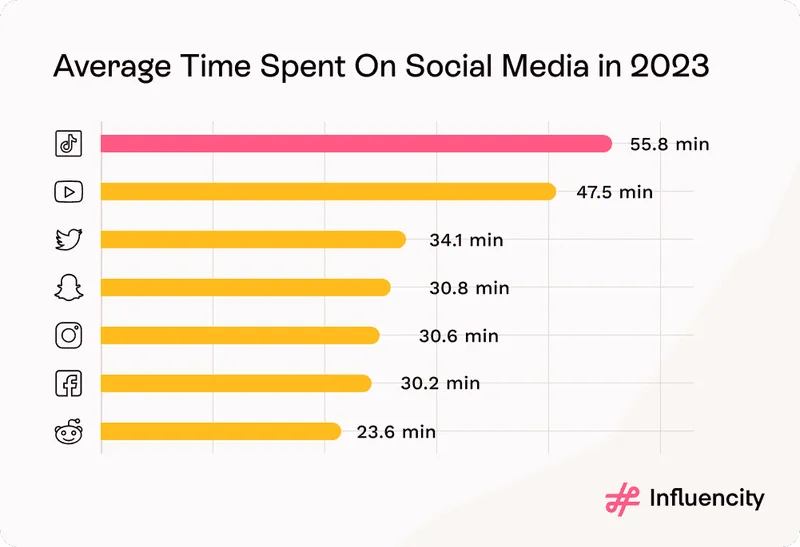
Image source
Use Structured Data
Using structured data helps in ranking better in the SERP for Google Knowledge Graph and other features.
If you’re aiming to have your site included as a link in AI Overviews, using structured data is important. Structured data provides the Google Knowledge Graph with a clearer picture of your content, making it more likely to be selected as a relevant and authoritative source for Knowledge Graph and AI Overviews.
E-E-A-T: expertise, experience, authoritativeness, and trustworthiness.
From Google’s guidelines, we know that content that aligns with E-E-A-T principles tends to be favored by Google’s algorithms. This doesn’t mean you will see traffic spikes immediately, but it DOES mean your content is positioned for long-term success and credibility.
And here’s something interesting: as Google uses E-E-A-T as a quality criterion to evaluate the credibility and relevance of web pages and websites, this means that these criteria will be used by AI systems to determine which content is credible and worthy of being featured.
So, prioritize building and showcasing your expertise, experience, authoritativeness, and trustworthiness.
This will not only help you rank higher but also establish your business as a trusted source in AI-driven search features.
Summary
To conclude, I invite you to join the discussion about your SEO challenges and explore strategies to improve your rankings in the AI Overviews era on our LinkedIn page.
If you have any questions, please feel free to reach out. I’m here to assist you!
In the meantime, I wish you success in becoming the leader in your business’s ongoing journey and achieving new milestones in this complex yet thrilling competition.
As we observe Google’s evolution, I hope your brand evolves successfully as well. May this new AI feature become your ally (not your adversary).
Best regards,
Alex
If you want to know more about how we can assist you with SEO, check out our services.