

Technological Taxonomy: Comparing Claude Team Platforms, Agent Teams, and Sub-Agents
The ongoing evolution of autonomous AI systems requires a clear distinction between the various collaboration and licensing tiers within the Anthropic ecosystem. In practice, the imprecise use of the terms “Teams”, “Agent Teams”, and “Sub-Agents” frequently leads to misunderstandings regarding technical capabilities and organizational application areas.
At the highest organizational level is the classic Claude Teams subscription. This is a purely collaborative platform for human workgroups utilizing a shared administrative framework, shared document repositories (Projects), and a centralized billing model.
Interaction here occurs manually via human prompts in a graphical web interface, with the AI acting strictly as a chat collaborator.
In contrast, Claude Code Agent Teams operate on a technical level. This framework represents a decentralized multi-agent architecture where multiple full-fledged, independent instances of Claude Code are launched simultaneously. These virtual team members (Teammates) coordinate autonomously via a shared, synchronized task list and communicate directly on a peer-to-peer level through an integrated mailbox system (AgentDM) to solve complex, multidimensional tasks in parallel. (Feature still experimental as of June 2026)
The lowest level of abstraction consists of Claude Sub-Agents. They are designed as lightweight, ephemeral helper processes structured strictly hierarchically. A Sub-Agent is spawned by a parent session for a single, well-defined task, executes it within an isolated context window, returns the result to the caller, and is then completely terminated, with its entire conversation history deleted. Direct communication between different Sub-Agents is architecturally excluded. An efficient tool for context management.
Evaluation Parameter | Claude Teams (Organizational) | Claude Code Agent Teams (Collaborative) | Claude Code Sub-Agents (Hierarchical) |
Target Group & Level | Human employees in shared workspaces. | Parallelized, autonomous software & system coordination. | Scoped helper services within a single session. |
Communication Pattern | Human-to-machine via web chat. | Autonomous peer-to-peer messaging via AgentDM bus. | Strictly unidirectional (feedback to parent session). |
Lifespan | Persistent (user profile and project history). | Persistent across the active session duration of the lead. | Ephemeral (immediate termination after task completion). |
Context Integrity | Single context window driven by the user. | Separate, completely independent context window per teammate. | Isolated, temporary context window per subtask. |
Licensing Requirements | Team or Enterprise license pool ($150+/user). | Pro, Max, or Enterprise API plans (usage-based). | Standard component of every Claude Code installation. |
Coordination Medium | Manual task assignment in chat. | Local, file-locked task list and mailbox. | Direct function calls via the integrated Agent tool. |
Claude Code Agent Teams
The inner workings of Agent Teams are based on a structured communication and synchronization protocol executed locally on the user’s machine. As soon as the system is initiated, the primary Claude Code session assumes the role of “Team Lead”. The lead agent acts as a central planner and supervisor. It analyzes the submitted overall task, translates it into a detailed, relational task list, and instantiates the required teammates while assigning unique identifiers.
The coordination of this agent swarm relies on a decentralized task database managed in the local directory under ~/.claude/tasks/{team-name}/.
Each task within this structure transitions through a predefined state machine from “pending” through “ready” and “claimed” up to “completed“.
Via the SendMessage tool, agents can send direct messages to specific colleagues or broadcast messages to the entire team. The system automatically embeds these incoming messages as structured <teammate-message> elements into the ongoing conversation history of the receiving agent. This enables complex, multi-angle debates and consensus-building without needing information to pass through the lead agent.
A crucial feature for controlling these workflows is Delegate Mode (activatable with Shift+Tab). When this mode is activated for the team lead, its operational scope is strictly limited to pure coordination, task distribution, and result synthesis. The lead agent is stripped of permissions to independently write code, execute system commands, or launch local test runs, which enforces an efficient division of labor and minimizes the risk of redundant resource consumption.
To safeguard critical system interventions, Plan Approval mode can also be configured. During complex or high-risk steps, teammates initially operate in a strictly read-only planning mode. They draft their planned implementation strategy and submit a formal approval request to the lead agent. The lead analyzes the proposed approach, checks it for architectural consistency, and either explicitly approves the task or returns it with constructive feedback for revision.
Custom Sub-Agents
For narrowly defined, specialized helper tasks that do not require continuous peer-to-peer communication, implementing custom sub-agents represents a highly efficient tool. Custom sub-agents are declaratively defined via Markdown files that combine a structured YAML frontmatter with the instance’s actual system prompt. The frontmatter controls the identity, tool permissions, and model assignment of the sub-agent.
Configuration Example:
name: marketing-claims-verifier
description: Analyzes marketing drafts for legal compliance and brand guidelines tools: Read, Grep, Glob model: sonnet isolation: worktree
You are a highly specialized compliance reviewer. Analyze the provided marketing texts for prohibited promotional claims, incorrect technical specifications, and stylistic deviations from the brand identity.
An outstanding security and stability feature in the sub-agent framework is the isolation: worktree attribute. When this property is declared in the frontmatter, Claude Code creates an isolated, temporary Git working copy (worktree) of the current repository upon spawning the sub-agent. This temporary branch is branched off from the project’s standard default branch rather than the uncommitted active workspace state of the main path.
All Bash, filesystem, or test commands executed by the sub-agent operate exclusively within this isolated filesystem area. This ensures that experimental code generations or aggressive searches have no side effects on the user’s active development branch. If the sub-agent completes its task successfully without leaving local filesystem changes, the temporary worktree is automatically cleaned up and deleted by the system. If a process attempts to access the main directory while the worktree is active or prematurely deleted, execution terminates with an error message to preserve source code integrity.
While in foreground mode, the sub-agent blocks the main conversation and passes any permission prompts directly to the user’s terminal; background sub-agents allow asynchronous parallel processing.
Should a sub-agent operating in the background encounter an operation requiring approval (e.g., writing a file or executing a potentially dangerous shell command), this request is transparently “bubbled up” into the user’s active main conversation (Prompt Bubbling). The user can confirm or reject this specific request via the lead agent’s terminal without terminating the entire background process.
Advanced Agent Capabilities: Skills, Hooks, and the Official Marketing Plugin
Skills in the Agent Context
A skill (also referred to as an Agent Skill) represents a reusable, modularized instruction and function unit based on the open Agent Skills standard, which operates across various AI interfaces. Technically, it is a dedicated directory containing a declarative Markdown file (SKILL.md) with structured instructions, workflows, and best practices. Claude Code automatically loads skills into the context window whenever the semantic description of the skill matches the current user request (Model-Invoked).
Benefits for Marketers: Marketers can leverage skills to deterministically standardize repetitive workflows such as weekly newsletter drafts, landing page analyses, or content audits. A skill like Brand Voice Enforcement autonomously checks every generated text against brand guidelines and corrects tonality deviations (“Voice Drift”) prior to output. A tool like the frontend-design skill also ensures that landing pages and user interfaces created for campaigns look aesthetically refined rather than generic through targeted CSS and typography rules.
Hooks in the Agent Context
Hooks are custom shell commands or scripts triggered event-driven at precise points in the Claude Code system lifecycle. Because hooks run strictly rule-based and not via unpredictable LLM reasoning, they offer deterministic control to secure workflows. In the Agent Teams framework, dedicated interfaces exist for this, such as TaskCreated, TaskCompleted, and TeammateIdle.
If, for instance, the TaskCompleted event occurs (a teammate attempts to mark a task as completed in the shared task list), the system executes the associated hook script. If this script (such as an automated grammar or compliance check) returns exit code 2, task completion is blocked, and the agent receives automated feedback for immediate revision.
The Official Claude Marketing Plugin
With the official open-source marketing plugin for Claude Cowork, Anthropic provides a powerful extension that divides typical marketing processes into preconfigured commands. Via CLI commands like /draft-content (for structured drafting of landing pages, newsletters, and blog posts), /campaign-plan (for developing content calendars and channel strategies), as well as /seo-audit, /brand-review, or /competitive-brief, campaigns can be managed directly from the console.
The plugin integrates seamlessly via the Model Context Protocol (MCP) into market-leading marketing and design SaaS interfaces such as Slack, HubSpot, Canva, Figma, Klaviyo, Amplitude, and Ahrefs. It functions as a highly time-efficient copilot. Since it can prepare drafts exceptionally well but cannot autonomously post, launch, or track campaigns, final approval and execution (closing the “Copilot-to-CMO” gap) always remain a safety guardrail in the hands of the human marketing operator.
Through the Claude UI, the plugin can be configured interactively with company-specific preferences, such as tone of voice.
Strategic Marketing Workflows and Operationalized Governance
Implementing agent teams in marketing organizations and digital agencies enables a transition from purely reactive AI writing tools toward highly standardized, parallelized production pipelines. By functionally specializing individual agent instances, the qualitative variance of human prompts is eliminated, ensuring consistent, brand-compliant output quality at industrial scale.
A particularly effective use case is establishing a semi-automated omnichannel content engine. This workflow addresses the classic challenge of manual content repurposing across multiple platforms by breaking the process down into isolated, highly specialized sub-steps coordinated via the local messaging system:
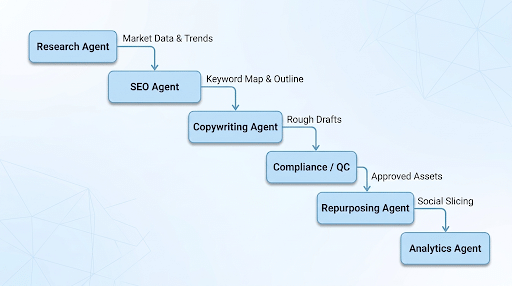
The process starts with the Research Agent, which conducts automated web scans of competitor channels, analyzes search trends, and prepares a strategic information briefing. This briefing is transmitted directly over the message bus to the SEO Agent. The SEO Agent structures the semantic requirements, defines primary and secondary keywords, and optimizes the content framework specifically for modern AI answer engines (Answer Engine Optimization / AEO).
The Copywriting Agent handles the structuring and generates the primary core article. Before this text is processed further, it passes through the Compliance and QC Agent instance. This agent compares the text against legal requirements, filters out unauthorized promotional claims or protected terms, and validates the factual baseline.
Only after a successful compliance audit does the Repurposing Agent take over the document. Its task is platform-specific slicing: it automatically generates LinkedIn posts, punchy Twitter threads, Reel video scripts, and personalized email nurture sequences from the core article.
Finally, the Analytics Agent prepares performance KPIs and drafts an automated reporting dashboard for success measurement.
Agent Role in Marketing | Functional Scope | Output Specification |
Research Agent | Primary market research, competitor monitoring, and target audience audits. | Structured research briefings, trend dossiers. |
SEO / AEO Agent | Keyword clustering, structuring for search engines, and semantic schema optimization. | Content outlines, structured JSON-LD schema blocks. |
Copywriting Agent | Creation of high-quality long-form content, landing page copy, and technical articles. | Rough drafts of blog posts, whitepapers, and ad copy variations. |
Social Repurposing Agent | Multichannel format conversion and audience-tailored tonality adaptation. | LinkedIn posts, newsletter sequences, video scripts for TikTok/Reels. |
Compliance / QC Agent | Strict brand consistency checks (Brand Voice), claims verification, and copyediting. | Edited text versions, compliance audit logs. |
Analytics Agent | Campaign performance forecasting, data cleaning, and metric visualization. | KPI dashboard specifications, anomaly forecasts. |
The operational safety of this system is guaranteed through a two-tier governance structure:
The “Brand OS”
To guarantee a consistent brand identity across all channels, a central knowledge base—the so-called “Brand OS”—is established in the project directory. This consists of structured Markdown files containing brand voice guidelines, exact tonality vectoring, prohibited promotional claims, defined buyer personas, and proven conversion patterns. Because all teammates automatically load the project context when spawned, all agents operate synchronously based on these identical identity specifications, reliably preventing uncontrolled stylistic drift.
Human-in-the-Loop Gating
Despite the high autonomy of agent teams, an iron rule applies in production environments: no autonomous system is authorized to independently publish campaigns, send direct messages to customers, activate ad budgets, or irreversibly alter local project data. All teammates work within a protected sandbox environment. Once a campaign is completely generated, the lead agent submits the results to the human operator in the terminal. Only after explicit human verification and approval does manual or semi-automated publishing occur via secure API interfaces.
Orchestration Alternatives – Example: teamfuse
Alongside native agent orchestration integrated directly into Claude Code, specialized frameworks have emerged in the open-source landscape and at the architectural level, offering alternative approaches for operating autonomous agent teams.
teamfuse: The Persistent Streaming Enterprise Stack
The teamfuse framework pursues the approach of mapping a full, virtual software and marketing enterprise locally inside a repository. In contrast to native agent teams, which are re-instantiated with every session and lose their configuration data upon closing, teamfuse relies on persistent, permanently background-active Claude Code sessions.
This system is based on a four-tier architecture:
- Operator Level: Enables controlling the team via standardized /teamfuse commands directly from an active Claude session or via a mobile Slack bridge for remote administrative access.
- AgentDM Message Bus: A dedicated messaging bus through which all agent DMs and group channels are processed in real time.
- Persistent Agent Instances: Five standalone Claude Code processes, each operating in its own directory (e.g., agents/marketing/) with its own CLAUDE.md and role-specific MCP servers. A resource-efficient Python wrapper keeps these processes continuously active via stdin/stdout interfaces (Streaming Agent Loop) and sends the /clear command between task steps, eliminating the time- and token-intensive cold-start overhead of loading MCP servers and skills.
Similar features are also offered by providers and frameworks such as CrewAI and OpenClaw.
Conclusion
At Digital Loop, we observe that the technology and tools are already available, but real value is generated when teams are enabled while maintaining governance for operations, collaboration, and quality assurance (branding guidelines, legal requirements, security, etc.). Many of these components are not exclusive to Claude, but represent industry standards widely supported across AI providers.
Starting with a Claude Teams license, companies and teams can set up their own centralized marketplaces (repositories) to improve availability and ensure update governance. Additionally, large public marketplaces such as mcpmarket.com exist.