


Why Everyone Is Talking About “Agent-based AI” Right Now and Why It Matters
Many people now realize that AI is more than just a chatbot: ask a question, get a text response. Prominent agent systems like Openclaw (formerly Moltbot) illustrate the continuous evolution of AI systems: They are not just “answer machines,” but can also (depending on configuration) perform actions such as reading and writing files, executing shell commands, browsing the internet, or communicating with you via messenger, “like a colleague.”
Agent-based systems are particularly useful when you want to automate recurring information and organizational tasks (monitoring, summaries, reports, API calls), and less so when you simply need better text (a regular chat is often sufficient for that).
ZeroClaw in Simple Terms and Why It’s a Good Alternative for Me
OpenClaw describes itself as “AI that actually does things,” such as cleaning up your inbox, sending emails, and managing your calendar, and is controlled via the chat apps you already use. ZeroClaw is one of many OpenClaw clones or forks and positions itself similarly to a personal assistant that you run on your own devices and that can respond via various channels.
First off: Much of this guide doesn’t work out of the box, and the setup does require some know-how, especially if, like in my case, you want to make ZeroClaw available on the web. For example, the AI suggested I set the workspace folder to 777 permissions; this would have made my central configuration visible on the web. Once set up, however, it’s very easy to work with, especially if you’re already using Claude Code, etc.
The main reason why it’s an interesting alternative to OpenClaw for me can be summarized in three points:
- Resource efficiency. ZeroClaw aggressively promotes its low RAM footprint and fast startup times, even providing a reproducible benchmark snapshot comparing it to OpenClaw (including RAM “< 5MB” vs “> 1GB” and cold start “< 10ms” vs “> 500ms”, including a note on Node.js overhead with OpenClaw). For “always-on” setups on small servers or underpowered hardware, this is a real, practical advantage.
- Security guardrails as the default mindset. ZeroClaw documents a defense-in-depth model with autonomy levels, workspace isolation, blocklists for critical paths (e.g., /etc, ~/.ssh), command allowlisting, and rate limiting/cost caps; features that give me more control over what the AI is allowed to do on my system and what it isn’t.
- Migration path. If you’re already using OpenClaw, there’s an explicit “Migrate from OpenClaw” path designed to, among other things, transfer workspaces/memories and convert configuration from JSON to TOML.
A bonus: With ecosystem tools, usage models can change very quickly. Example: In early April 2026, Anthropic restricted the use of OpenClaw via standard Claude subscriptions and charged additional fees. The direction is clear: Tool usage ≠ standard subscription usage. In such a situation, “provider agnosticism” and rapid rerouting (API keys, local endpoints, failover) are not just “nice to have” for many teams, but a matter of operational reliability.
A Note on OpenClaw to Ensure a Fair Comparison
OpenClaw is extremely popular, has very high ratings on GitHub (as of early April 2026), and boasts an enormous community. Its self-description highlights the idea: “You message the agent in your chat, and it handles tasks for you,” including integrations and automations.
How it works in broad terms: There is a “gateway” serving as a control and communication hub to which UIs, clients, tools, and events connect. Added to this is a “skill” concept: Skills are essentially packaged capabilities or integrations that can be found and installed via a registry model (ClawHub). This concept is also used in Claude Cowork / Code.
Why I still find OpenClaw important as a reference: It has turned out that “Chat-first + Actions” works for both personal and professional workflows, including for scheduling/automation approaches, which are openly discussed and documented in the community. For the right use case, this is a very powerful system.
What ZeroClaw Can Do and How It Works
ZeroClaw describes itself as a “personal AI assistant” that responds to you on channels and also offers a web dashboard for control and monitoring. At its core is a highly operational modular principle:
The gateway is the control center: It can run as a webhook server/dashboard and forms the system’s control plane.
Channels are the “inputs/outputs” through which you communicate with the agent. In practice, this means: You can connect ZeroClaw to chat interfaces (e.g., via WhatsApp, Telegram, Slack, or Discord) without having to build your own UI.
Providers are the model connections: In the official config documentation, you’ll see that you can define model routing/“hints” (e.g., a “local” hint to Ollama models, a “reasoning” hint to a more powerful model) and that there are provider-specific settings.
Tools are what distinguish a chatbot from an agent: Shell, file I/O, browser/web fetch/search, Git operations, as well as integrations like Notion/Jira/Google Workspace are listed in the feature set. (Important: Whether you enable them and how you secure them is your responsibility.)
Autonomy & Sandbox form the security foundation: ZeroClaw documents autonomy levels (described in various places as ReadOnly/Supervised/Full or approve/supervised/auto) and links them to workspace scoping, allowlists, and global prohibition paths.
Scheduler/Cron is the heart of automation: In the official wiki documentation, the Scheduler is described as an engine that executes both shell commands and agent prompts on schedules, enforcing security policies and optionally delivering results via channels. This makes the “24/7 assistant” practically possible because you’re not tied to an open terminal session on your laptop. It works wonderfully on my smartphone and consumes fewer tokens and resources (as well as costs) than, for example, Claude Dispatch (a remote service from Claude Cowork).
In summary:
It is optimized for “always-on” and “small footprint”—exactly what you need if you want to run an agent as a service on a small server.
It has a very explicit security language: pairing, workspace boundaries, allowlists, rate limits, forbidden paths; you do have to understand this, but at least it’s documented as a standard.
It’s designed to be “provider-agnostic”: local models vs. cloud models are a routing issue; this is crucial for costs, privacy, and reliability.
Metric | ZeroClaw (Rust) | OpenClaw (Node.js) | Comparison |
Cold start time | ~15 ms | ~2.800 ms | ZeroClaw is ~186× faster |
RAM (idle) | ~8 MB | ~180 MB | ZeroClaw uses ~22× less RAM |
RAM (activ) | ~25 MB | ~450 MB | OpenClaw scales to over 1 GB |
Throughput | ~380 req/s | ~85 req/s | ZeroClaw handles ~4.5× more requests |
Source: https://www.zeroclaw.dev/compare/zeroclaw-vs-openclaw.html
ZeroClaw Setup Video
Specific Examples for Marketers, Companies, and Product Owners
My Goals with ZeroClaw
I came across ZeroClaw while searching for an AI agent that I could run 24/7 on a server at a reasonable cost and control via my shell as well as my smartphone (WhatsApp and Slack). My use cases included:
- Daily/weekly updates on tech and AI trends
- Ongoing creation of social media and blog posts that can be published upon approval
- Simple Q&A capabilities for both personal and professional information
- Proactive reminders and recommendations based on my notes, e.g., “Hey, your to-do list is getting longer and longer…”
- Searching for YouTube videos and evaluating whether they make sense for me, then “clipping” them into my Obsidian Inbox
- Simple “Talk to Your Data” cases like traffic, visibility of my sites, etc.
- For personal use, also a service that reminds me, based on my calendar, to organize a trip, including flight and hotel suggestions via Booking MCP.
→ All of this is accessible via a central channel and on mobile.
In my setup, I’ve set up ZeroClaw as a Docker container on a server running Plesk. The advantage of Docker is that all packages, etc., run within Docker and not on my server. This is also recommended for Claude Code Projects, etc.
The first challenge was to set up the shared folders between Docker and the server with the correct users and permissions, and to configure an Nginx proxy that is accessible via WebUI through my domain. It’s best to create the user “zeroclaw”—which is used in Docker—on the server as well, with the same UID.
Since ZeroClaw doesn’t offer a hosted service, it makes sense to have a trusted server admin set everything up for you to avoid potential security risks.
Possible Use Cases with ZeroClaw (or Similar OpenClaw Clones)
I’m deliberately writing this as “use case sketches,” not as promises. Whether it works for you right away depends heavily on which tools/channels you enable and how clearly you define policies. Unfortunately, the setup takes some time, and you should familiarize yourself with the central configuration config.toml.
Marketing Example: Trend Radar Plus Weekly Review
Idea: An agent that provides you with a concise overview daily (or weekly):
“What’s new, what’s relevant, what should I check?” This isn’t magic; it’s scheduling + web research + summarization + delivery to your chat. ZeroClaw has the building blocks for this: web tools (Fetch/Search/Browser), a scheduler running as a daemon, and delivery via channels.
The scheduler launches an agent job that (within your domain allowlist) crawls sources, summarizes the results, and posts the summary to your Messenger/Team chat. Domain allowlists and security levels are crucial here to ensure “web navigation” doesn’t escalate uncontrollably.
Marketing Example: Content Creation with “Briefing → Draft → Send Draft”
If you use integrations like Notion/Google Workspace workflows (e.g., briefings/notes in Notion, voting via email), you can use the agent as a “summarizer + first draft”: They read a briefing from your workspace, generate variants, and save the result files back to the workspace.
Project Manager / Product Owner Example: Ticket Digest and Prioritization Prep
As a PO, you don’t want an agent to “sort tickets on their own,” but you do want them to handle the prep work for you:
Scan the Jira board, flag duplicates, explain relationships, create a rough draft of release notes, and highlight risks. ZeroClaw identifies Jira as a tool category and offers a memory/workspace logic to “remember” these relationships.
Project Manager / Product Owner Example: Release Communication in the Team Chat
A classic PO task involves recurring communication: “What’s shipping this week?”, “Which bugs are critical?”, “What’s blocking progress?”. This is ideal for Cron/Daemon + delivery in a channel. The scheduler can execute agent prompts on a schedule and deliver results via channels, entirely according to your pattern and priorities.
My Conclusion
It’s currently more of a well-made playground with real strengths, but it takes time to understand the system and even more to configure everything.
I also tried Openfang (https://www.openfang.sh/). However, it has a significantly smaller community, no current Docker container, and, for my use cases, no relevant difference from ZeroClaw.
For Digital Loop, it was also important to me to get a feel for such AI systems and OpenClaw forks. It seems to me that, much like the crypto ICOs/IPOs a few years ago, many promise a lot in their white papers, but most won’t succeed.
I was also interested in assessing whether this could lead to, for example, a service in our Digital Loop portfolio, such as “AI Agent System Setup” or “Audits, Monitoring with Subsequent Optimization,” etc. The approach is similar to our product or MarTech projects: identify and map business workflows and tasks → design target workflows (“where and how does AI help me?”) → setup and implementation → roll-out and onboarding customers → iterative optimizations. I definitely see potential here for technical service providers.
→ ZeroClaw offers a glimpse into the future of marketing teams, except that today we still have to be the architects before agents can truly work autonomously.
What I’d Also Emphasize from Personal Experience (Also Applies to OpenClaw):
- Not enterprise-ready: In my testing, it doesn’t feel like an “enterprise product” that you can simply roll out to a large team. ZeroClaw does have strong protection mechanisms (workspace scoping, forbidden paths, allowlists, rate limits), but it’s still “privilege + automation.”
- What ZeroClaw can’t do (or realistically shouldn’t be expected to do): It doesn’t guarantee correct actions: An agent can make mistakes; research on OpenClaw-like systems specifically describes how operational privileges increase system risks.
- It doesn’t “magically” conjure up permissions: Everything hinges on tokens, app rights, workspace boundaries, and your tool approvals. “Approval” and “Supervised” modes exist precisely because agents shouldn’t be executed blindly.
- It does not replace team governance: When multiple people are involved, you need clearly defined processes (“Who is authorized to approve pairings? Who can create cron jobs? How is auditing conducted?”). ZeroClaw provides technical mechanisms (allowlists/pairing/policies), but organizational governance remains your responsibility.
A Selection of Providers and Frameworks That Are Enterprise-Ready
Layer | Framework / Provider | Status | Focus |
Orchestration | n8n / LangGraph | Enterprise Ready | Complex, visual workflows & security |
Reasoning | OpenAI / Anthropic | Enterprise Ready | Highest intelligence & reasoning power |
Frameworks | CrewAI / Dify.ai | Prototyping bis Prod. | Multi-agent collaboration & RAG |
Infrastructure | Microsoft Azure AI | Enterprise Ready | Compliance, hosting & scalability |
Why It’s Still Good for Simple Cases
If you use it for “Scheduled Research & Summaries”—that is, for gathering and synthesizing information, reminders, and regular reviews—then the benefits are significant and the risks are more manageable, because you can keep autonomy low and limit actions to “read-mostly.”
And yes: Always-on via a daemon/scheduler on a server is exactly what makes the most sense to me with ZeroClaw. The scheduler is explicitly part of the daemon’s operation and can deliver results to channels.
Alternatives That May Be a Better Fit Depending on Your Goals
If you primarily want to automate code workflows, Claude Code is a very obvious alternative, especially since its Dispatcher or Remote Control feature allows access from your Claude smartphone app. Unfortunately, I keep running into limitations and have to restart the Claude service on the server and issue commands via SSH.
Similarly, OpenAI’s Codex CLI positions itself as a local coding agent in the terminal that can read, modify, and execute code in a selected directory.
If you’re looking for more mature systems for business or enterprise environments, you can’t go past CrewAI. Claude Code and the open-source version of CrewAI work wonderfully. CrewAI also offers a paid SaaS service.
If, as a marketer or product owner, you prefer “business automation” without server ops, no-code or low-code automation platforms are often more practical: Zapier promotes orchestration across thousands of apps and “AI workflows/agents” as a managed layer. n8n is particularly exciting if you want self-hosting, but self-hosting requires technical knowledge and can lead to security issues and downtime. However, N8N has a very large community that offers many workflows and support. If you need workflows where you expect clear input and precise output, such tools are a better choice than agentic AI systems.
The ultimate goal is to combine both worlds: orchestration and the “brain” using agentic AI (OpenClaw, ZeroClaw, CrewAI, Claude, etc.) and then execution via skills and N8N workflows—the classic “brain and hands” principle.
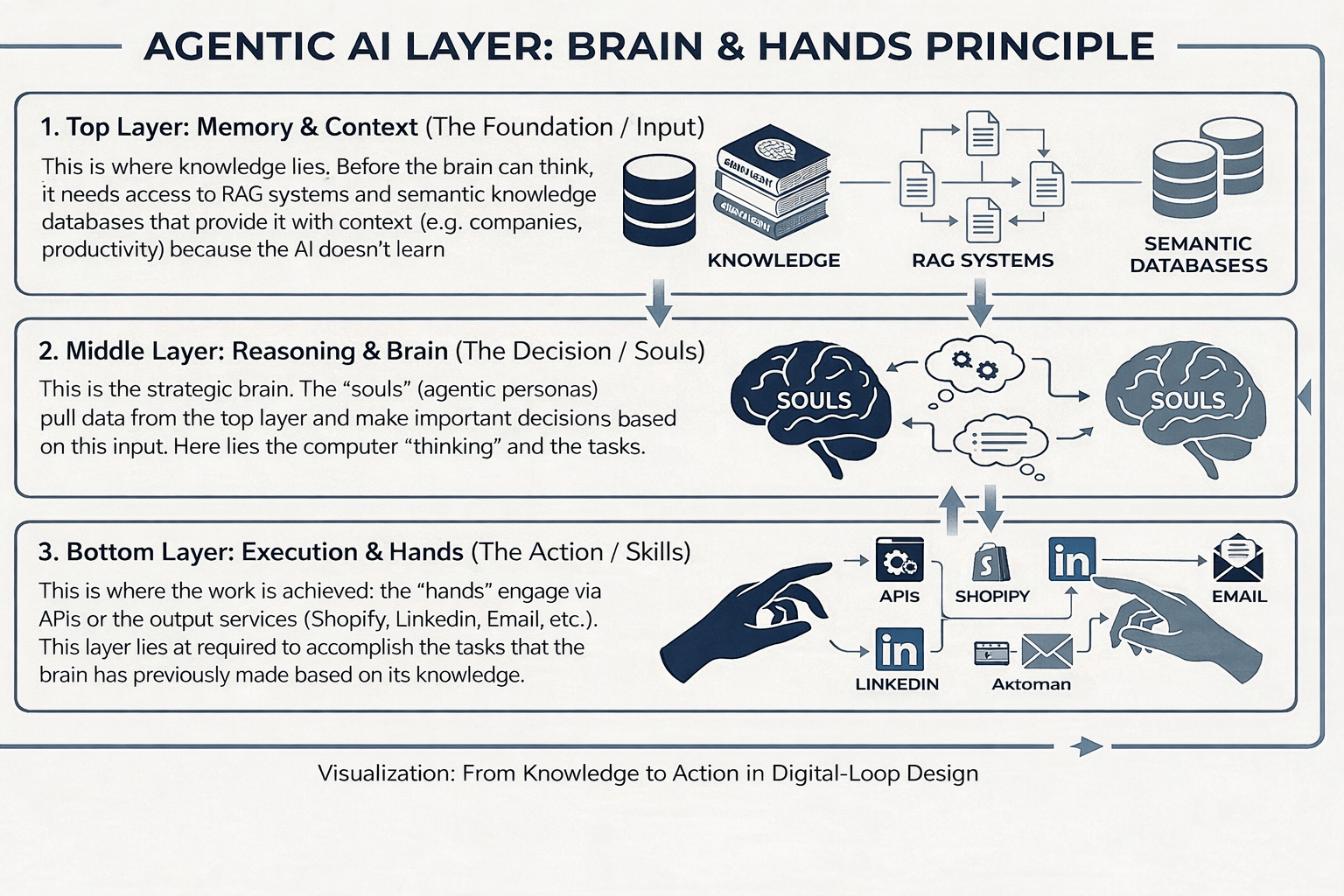
This image was generated by Gemini AI.
If you (or your team) do have engineering capacity and want to build “agents as a product,” frameworks like LangGraph (from LangChain) are relevant, but this is more of a “development toolkit” than an end-user assistant.
The bottom line is clear: In its current form, ZeroClaw is not yet an enterprise product that you would roll out in a large team without dedicated governance processes. Rather, it is an extremely exciting and efficient proof-of-concept platform. It is precisely this glimpse into the future of automation that makes it so valuable to me. The direction is clear: AI agents are coming. I’m curious to see which of the current open-source initiatives—such as ZeroClaw, OpenClaw, CrewAI, or others—will prevail in the long term, what business models will develop around them, and which will bridge the gap between enthusiast tools and business standards.
————
Sources:
- OpenClaw https://openclaw.ai/
- zeroclaw-labs/zeroclaw: https://github.com/zeroclaw-labs/zeroclaw
- ClawKeeper: Comprehensive Safety Protection for OpenClaw Agents Through Skills, Plugins, and Watchers
- Kept Auditing OpenClaw on AWS Lightsail: 53 Default: https://dev.to/aws-heroes/i-kept-auditing-openclaw-on-aws-lightsail-53-default-skills-no-channel-access-controls-deletable-37e8
- Configuration Guide – ZeroClaw: https://www.mintlify.com/zeroclaw-labs/zeroclaw/configuration