


Welcome back to our blog series on SEO competitive analysis. In the first part (Enterprise SEO Competitive Analysis Part 1), we discussed why competitive analysis is necessary and how to get started. In the second part, we delved deeper and showed you how to conduct a content analysis of your competitor’s website. But you guessed it: we haven’t yet covered the technical aspects.
In this third part, we’ll explore how to analyze your competitors from a technical perspective, using metrics such as Core Web Vitals (CWV), website speed, crawlability, HTTP response code, schema markup, and more.
Core Web Vitals
Optimizing Core Web Vitals (CWV) is important not only for search engines but also for visitors. In April 2023, Google simplified the impact of Page Experience Signals on overall search engine ranking. According to Google, CWV is an important ranking factor, but improving one or two metrics doesn’t guarantee a better placement for a specific page in the SERPs. Instead, you improve the overall user experience and secure Google’s favor for your website. After all, it’s no secret that user experience and helpful content will be top priorities for Google in 2026.
Google now has three Core Web Vitals: Largest Contentful Paint (LCP), Interaction to Next Paint (INP), and Cumulative Layout Shift (CLS).
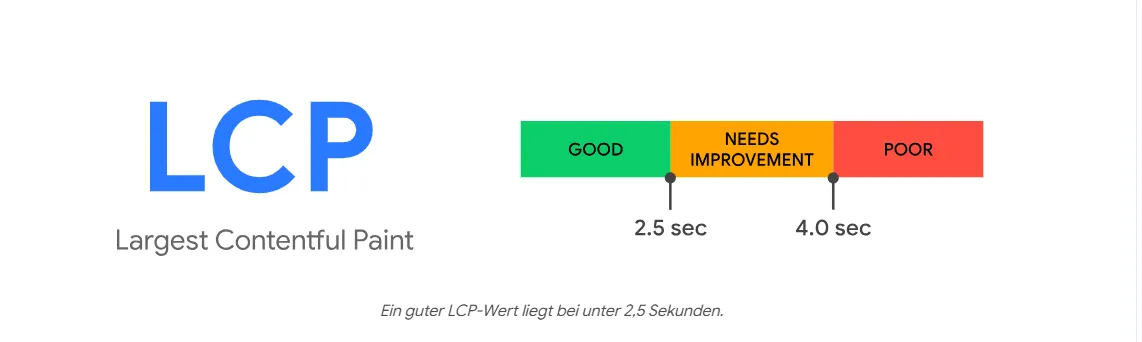
- Largest Contentful Paint (LCP): This measures how quickly the largest element on your page loads. Ideally, it should load in 2.5 seconds or less (75th percentile): This means that out of 100 user experiences, at least 75 should have a load time of 2.5 seconds or less. If competitors’ websites take more than 4 seconds to load their largest element, this can be considered poor performance. Between 2.5 and 4 seconds lies a gray area that, while not bad, still needs improvement.
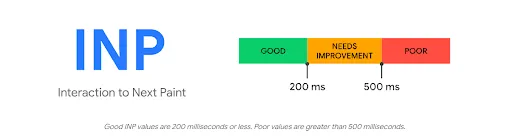
- Interaction to Next Paint (INP): In March 2024, Google replaced First Input Delay (FID) with Interaction to Next Paint (INP). Previously, FID only measured the time difference between the user’s initial input and the browser’s response time. INP now improves upon this limitation and captures the latency of all user interactions (clicks, taps, keystrokes) throughout the entire page session. This is a more comprehensive approach that better explains how the page responds over the entire session. 200 ms or less (75th percentile) is considered a good INP value. This means that at least 75 out of 100 user experiences should have an interaction time of 200 ms or less.
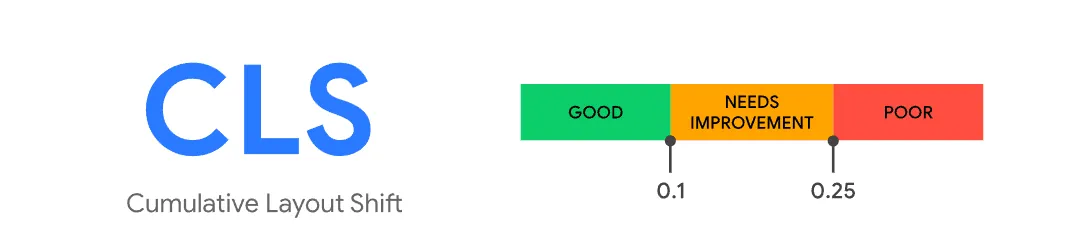
- Cumulative Layout Shift (CLS): This is an important web performance metric that measures the stability of a website’s visual elements. It’s part of Google’s Core Web Vitals and focuses on how much the visible content of the page unexpectedly shifts from one position to another during loading time, which can significantly impact the user experience. A CLS score below 0.1 is considered good (75th percentile), while a website with a score between 0.1 and 0.25 needs improvement. This means that out of 100 user experiences, the cumulative score should not exceed 0.1 in at least 75 cases.
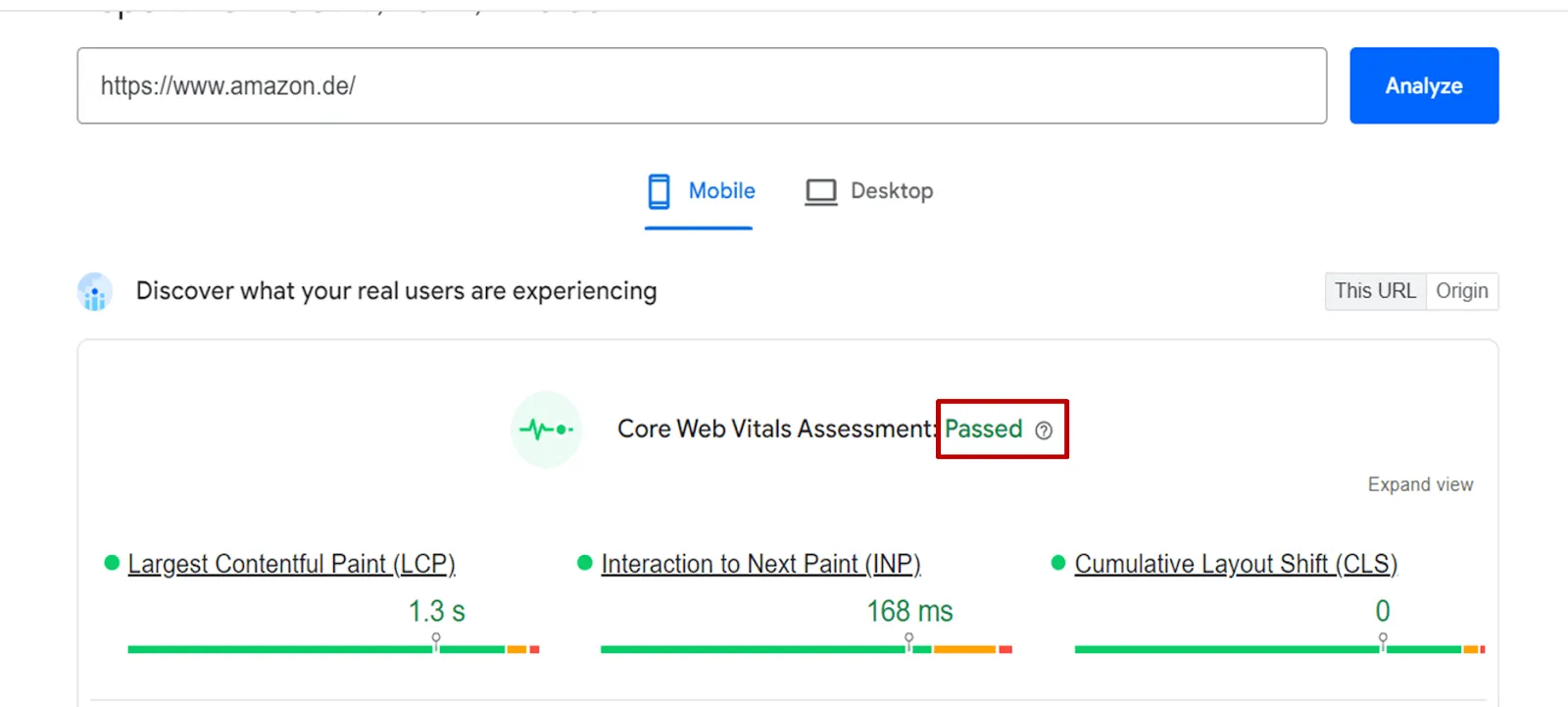
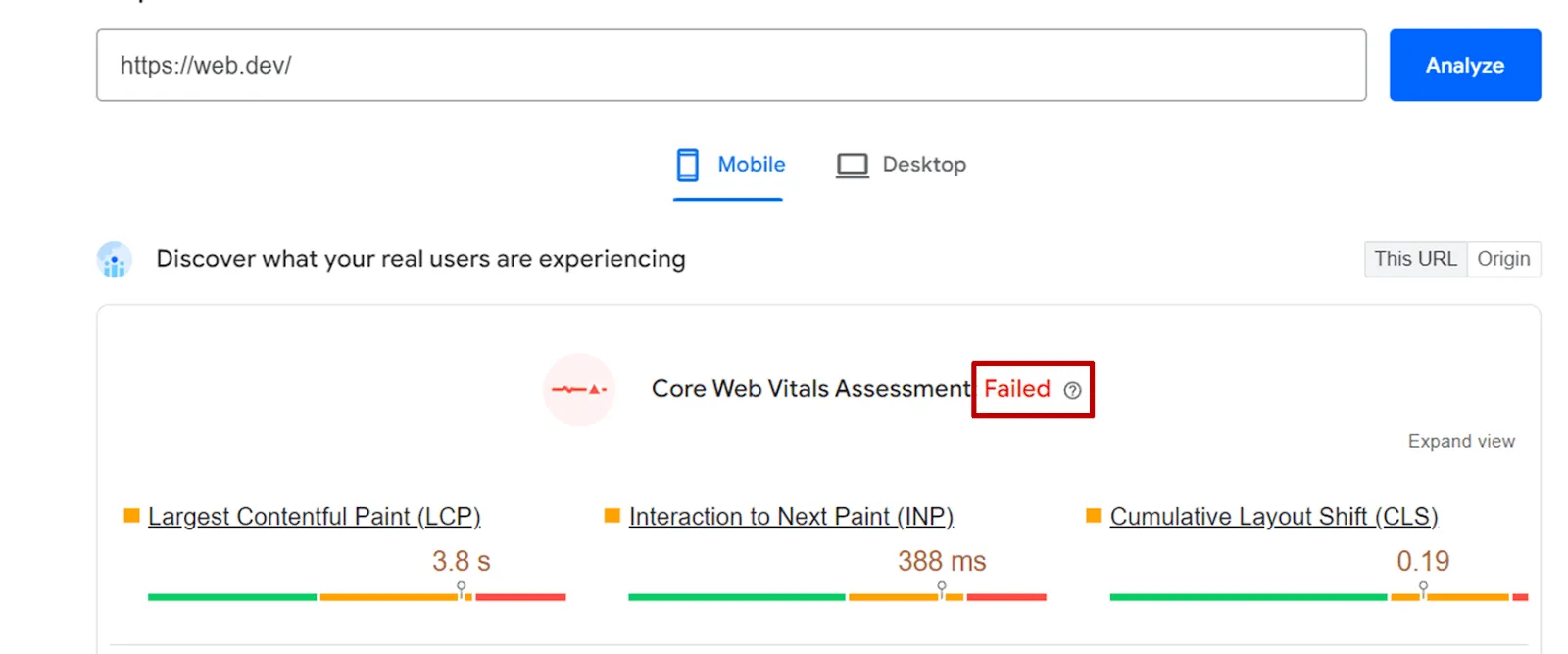
You can use PageSpeed Insights to measure your competitors’ Core Web Vitals since you don’t have access to Google Search Console. If your competitors’ websites meet all three metrics, you’ll see a “Passed” status in PageSpeed Insights.
If your competitor’s website does not meet all three metrics, PageSpeed Insights will display an error status like this: “Failed”.
Core Web Vitals are already considered by Google as a measurable ranking factor. According to Sistrix, websites with at least one Core Web Vitals (CWV) metric showing problems, such as slow loading or unstable layouts, experienced a 3.7% drop in their Visibility Index.
Furthermore, good Core Web Vitals (LCP, INP, CLS) improve the user experience by ensuring fast loading, smooth interactions, and visual stability, which boosts engagement, conversion rates, and SEO ranking. Poor scores lead to frustrated users, higher bounce rates, lower search engine visibility, and ultimately, negative impacts on revenue and brand perception.
Website speed and mobile friendliness
A good Core Web Vitals (CWV) score means your competitors’ websites load quickly and offer an excellent user experience. PageSpeed Insights lets you check the CWV score for both web and mobile platforms. Chrome Dev Tools also allows you to delve deeper into website speed and mobile-friendliness. With Chrome Dev Tools, you can check loading speeds for both mobile devices and desktop computers. Furthermore, they offer various internet speeds, such as fast 4G, slow 4G, and 3G, to test real-world user experience.
Fast-loading websites improve user satisfaction, reduce bounce rates, and increase conversion rates, while slow performance frustrates visitors, worsens SEO rankings, and directly impacts revenue. Conversely, a mobile-optimized website ensures accessibility, smooth navigation, and greater interaction across all devices, improving SEO and conversion rates. A poor mobile user experience leads to user churn, negatively impacts search engine visibility, and weakens brand trust.
Crawlability and website structure
A well-structured sitemap, clean URLs, and the correct use of robots.txt are crucial elements to ensure that search engine bots can find and crawl your website. Review the URLs in your competitors’ sitemaps. URLs with 3xx, 4xx, or 5xx response codes in their sitemaps are a bad sign, as a sitemap should only contain important URLs that result in a 2xx response code. If you don’t understand these status codes, don’t worry. We’ll cover them in a few minutes.
URLs should not contain capital letters, underscores, or special characters. And be careful: underscores are not a substitute for hyphens. Your robots.txt file should be online to tell search engines which pages to ignore.
You should also check the crawl depth of your competitors’ main web pages. Ideally, all important pages should be accessible within 2-3 clicks from the homepage. If you find the above-mentioned problems on your competitors’ websites, this is a good indication that they are not taking technical SEO and user experience seriously.
HTTP-Statuscode
HTTP response codes can be thought of as short messages from a website’s server or browser that explain what happened to your request or interaction (such as clicking a link). Some important response codes you’ll encounter when reviewing your competitors’ websites include:
- 2xx – Success: 2xx codes indicate that the website is reachable.
- 3xx – Redirect: Two commonly used 3xx codes are 301 and 302. The 301 redirect response code means that the webpage has been permanently moved to a new location, while 302 indicates that the page has been temporarily moved to a new location. Redirecting URLs isn’t inherently bad if implemented correctly. However, the unnecessary use of redirects can lead to a redirect chain, which increases loading time and ultimately results in a poor user experience.
- 4xx – Client Error: 403, 404, and 410 are the most commonly used 4xx response codes to report errors. 403 is a forbidden request, meaning the server understands your request but denies access. Both 404 and 410 mean that the content was not found, but the 410 response code specifically means that the content has been intentionally removed (“410 – Gone”). If you notice a significant number of 4xx response codes on your competitor’s website, this could indicate that it contains many broken links, which can ultimately negatively impact its ranking.
HTTP response codes directly impact business results: 2xx codes ensure a smooth user experience and correct indexing, increasing trust and conversion rates. 3xx redirects, when implemented correctly, help maintain traffic, but can negatively affect search engine optimization and tracking if misused. 4xx errors frustrate users, harm SEO, and lead to lost sales or leads. In short, stable and correct response codes are crucial for customer trust, search engine visibility, and business performance.
Schema-Markup
Schema markup is a type of structured data used to provide information about a specific web page and its content in a way that is easier for search engine platforms like Google or Bing to understand. The code is primarily written in JSON-LD, RDFa, or Microdata formats and then inserted into the page’s HTML code. Popular schema markup types include Breadcrumb List, Product Rich Snippets, Article, Organization, Website, and Local Business.
For more information on schema markup and structured data, see our blog post “How to increase your visibility with structured data (schema markup)”.
Schema markup is essential for today’s websites, as it not only helps search engine bots understand your business and content but also contributes to better visibility. For example, in several tests, we found that adding product rich snippets can lead to higher click-through rates and better user engagement, since the overall rating gives visitors a sense of reassurance that existing customers love the product.
In short, if your competitors aren’t using structured data with schema markup, you should consider implementing it on your website to boost traffic and click-through rate (CTR). However, if you find that your competitors have already implemented schema markup, you should definitely do so as soon as possible!
How generative AI optimization (GAIO) is changing technical SEO audits
The growth of generative AI platforms like Google AI Overview, ChatGPT, Perplexity AI, and AI Mode is already changing how technical SEO audits are conducted and how their importance is perceived. Traffic from informational keywords is significantly impacted, as fewer people are visiting actual websites than before.
This doesn’t make technical improvements any less necessary, as your website now needs to be easily accessible not only to human visitors but also to various bots from generative AI platforms.
Crawlability and indexability: Structured markup, clean sitemaps, and semantic HTML are even more valuable because AI systems rely heavily on clear, machine-readable content to generate summaries. A landing page or website with well-structured content is more likely to be cited and crawled by AI bots. Websites with weak internal linking or a poor sitemap may be less visible, as AI crawling bots, like traditional search bots, also depend on these elements.
Page Speed and Core Web Vitals (Performance): We recently conducted an AI Overview traffic analysis and found that approximately 53% of the cited URLs failed the CWV test. This result wasn’t a huge surprise. While CWV is an important ranking factor, it doesn’t guarantee a higher ranking on Google search results or AI platforms. Content quality, domain authority, backlinks, internal linking, and structured data also play a crucial role.
Passing the CWV test can be seen as a good indication that your website is both crawlable and user-friendly, and therefore more likely to be cited by AI search engines.
JavaScript & Rendering: Websites using server-side rendering (SSR) or progressive enhancement are more AI-friendly. AI models and crawlers often struggle with heavy client-side JavaScript, so technical audits that improve rendering have a direct positive impact.
While Google no longer has issues rendering JavaScript code, other, relatively newer AI search platforms like ChatGPT and Perplexity AI still have significant difficulty crawling and rendering it. This means that if your website relies heavily on client-side JavaScript, you may be missing out on organic traffic from these AI search engines.
To be honest, it’s not always that simple. You need to conduct a proper GAIO audit to understand the actual impact. If you need help with GAIO optimization or a GAIO audit, please don’t hesitate to contact us. Thanks to our many years of experience, we know exactly how to optimize your company website to achieve higher citations and more organic traffic on AI search platforms. Take a look at our GAIO consulting services page.
Bonus section: Free SEO competitor analysis template with a 7-step guide
As promised, we’ve compiled a free, comprehensive SEO competitive analysis template for you. This template includes a 7-step guide and practical tips to help you systematically evaluate key SEO factors such as keyword gaps, backlinks, on-page SEO, technical SEO, local SEO, and more.
Download the free SEO competitive analysis template
Step 1: Overview of the competitors
You should begin the process by entering basic information about your competitors, such as their domain names, domain authority, top-performing pages, target audience, and so on. This approach will give you a good overview of who you’re dealing with.
Practical tip: Pay attention to your competitors’ relevance, organic traffic, and domain authority to decide whom you want to analyze more closely, as analyzing all competitors would take several days.
Step 2: Keyword analysis
The next step is to identify and compare the keywords your competitors are ranking for by highlighting the keyword gaps. In the Excel file, under the “Keyword Analysis” tab, you’ll find various columns, such as competitor keywords, search volume, keyword difficulty, ranking position, and so on. Fill in these columns according to the guidelines explained earlier. If you have any questions, refer to the sample data for clarification.
Practical tip: We recommend focusing on competitor keywords with high regional/global search volume and traffic potential, as well as low difficulty. Use these insights to adjust your keyword strategy. Don’t forget to conduct A/B tests.
Step 3: Backlink Analysis
Examine the quality and quantity of your competitors’ backlinks. Understanding the source of their link authority can help you identify link-building opportunities for your own website. The “Backlink Analysis” tab includes columns such as total number of backlinks, top backlink sources, anchor text, link type (Do/NoFollow), and domain authority of the sources. Be sure to follow the previous instructions when filling in this information. If you are unsure, refer to the sample data for clarification.
Practical tip: Identify relevant websites with high domain authority and low spam scores that your competitors are using for backlinks. Contact them and focus on other gaps where you can acquire high-quality, relevant links.
Step 4: On-Page-SEO-Audit
Review on-page SEO elements such as title tags, meta descriptions, and the content structure on your competitors’ websites.
Identify the areas where your content outperforms theirs and make adjustments accordingly. Under the “On-Page SEO” tab, you’ll find columns for title tags, meta descriptions, header tags (H1, H2), content quality, internal linking, and content length. Ensure all entries comply with the previously discussed rules. If anything is unclear, review the sample data for clarification.
Step 5: Technical SEO audit
Technical SEO issues can be a significant ranking factor, so it’s crucial to identify areas for improvement. On the “Technical SEO” tab, you’ll see fields such as Core Web Vitals (mobile and desktop), Website Speed (mobile and desktop), Mobile Responsiveness, Schema Markup Usage, and Technical Issues. Ensure you enter the data according to the instructions discussed earlier. If you’re unsure, refer to the sample data for clarification.
Practical tip: To gain an edge over your competitors, improve the areas where they have weaknesses. For example, prioritize mobile-friendliness if one of your main competitors hasn’t optimized for mobile devices.
Step 6: Local SEO (if applicable)
This is an optional step, meaning you should only perform it if your client or website is targeting local search queries. The “Local SEO” tab contains columns such as “Google My Business Profile Optimized,” “Total Local Mentions,” “Online Review Rating,” and “Local Pack Rank.” Carefully complete these sections according to the previous instructions. If anything is unclear, please refer to the sample data for clarification.
Practical tip: Optimize your Google My Business profile and gather more online reviews to improve your chances of appearing in local search results. You should also engage with your audience and listen to their complaints, concerns, and feedback.
Step 7: Content Performance
Finally, you should analyze which types of content are performing best for your competitors and why. On the “Content Analytics” tab, you’ll find fields for your top-performing content, content type, content traffic, engagement metrics, and content gaps. Fill in these fields according to the instructions provided earlier.
Practical tip: Focus on content types (blog posts, videos, etc.) that resonate with your target audience and optimize them for engagement metrics such as click-through rate (CTR), time on page, and bounce rate.
Conclusion
Yes! We did it! Together, we examined all the necessary components for a high-quality SEO analysis of your competitors, from analyzing their keywords and backlinks to one-page SEO and technical SEO. A comprehensive competitive analysis uncovers gaps in your current SEO approach and reveals growth opportunities.
However, the way we do SEO has changed quite rapidly since last year. Therefore, staying ahead of the competition is crucial to generating more traffic. This requires continuous monitoring and refinement of your SEO strategies to ensure long-term success. If you enjoyed this post, please share it on social media so your friends can benefit too.